Tax Software


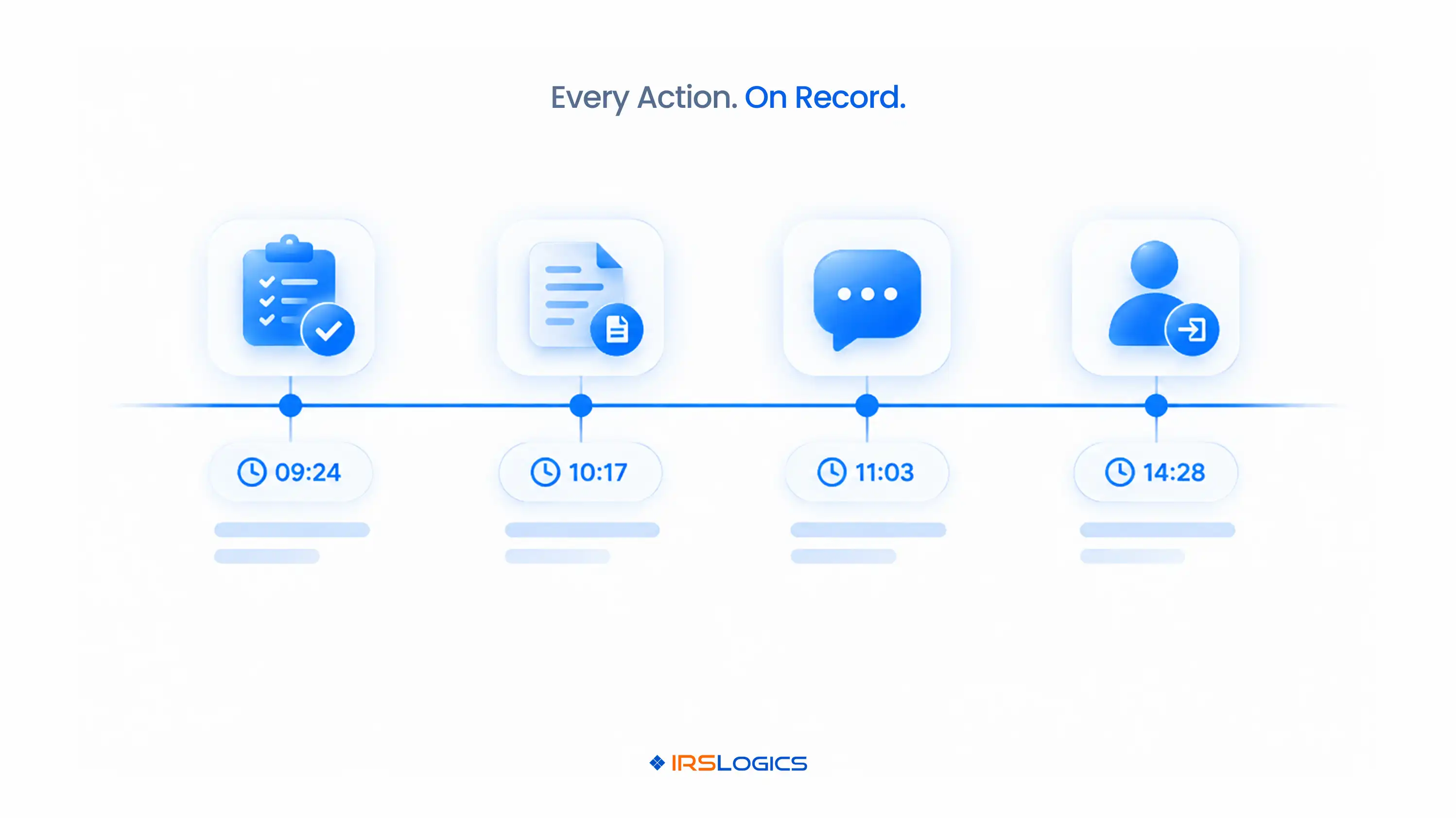
Tax audit trail software automatically records who did what, when and on which case inside a resolution firm. That covers:
Not an IRS audit. Your own paper trail.
Because in resolution work, "I'm pretty sure we sent that" doesn't hold up.
Not with clients. Not with the IRS. Not even with your own team.
TL;DR
Let's clear this up first.
When most people hear "tax audit," they picture an IRS examiner. That's not what we're talking about.
In a resolution firm, an audit trail is the timestamped history of everything that happens inside your system.
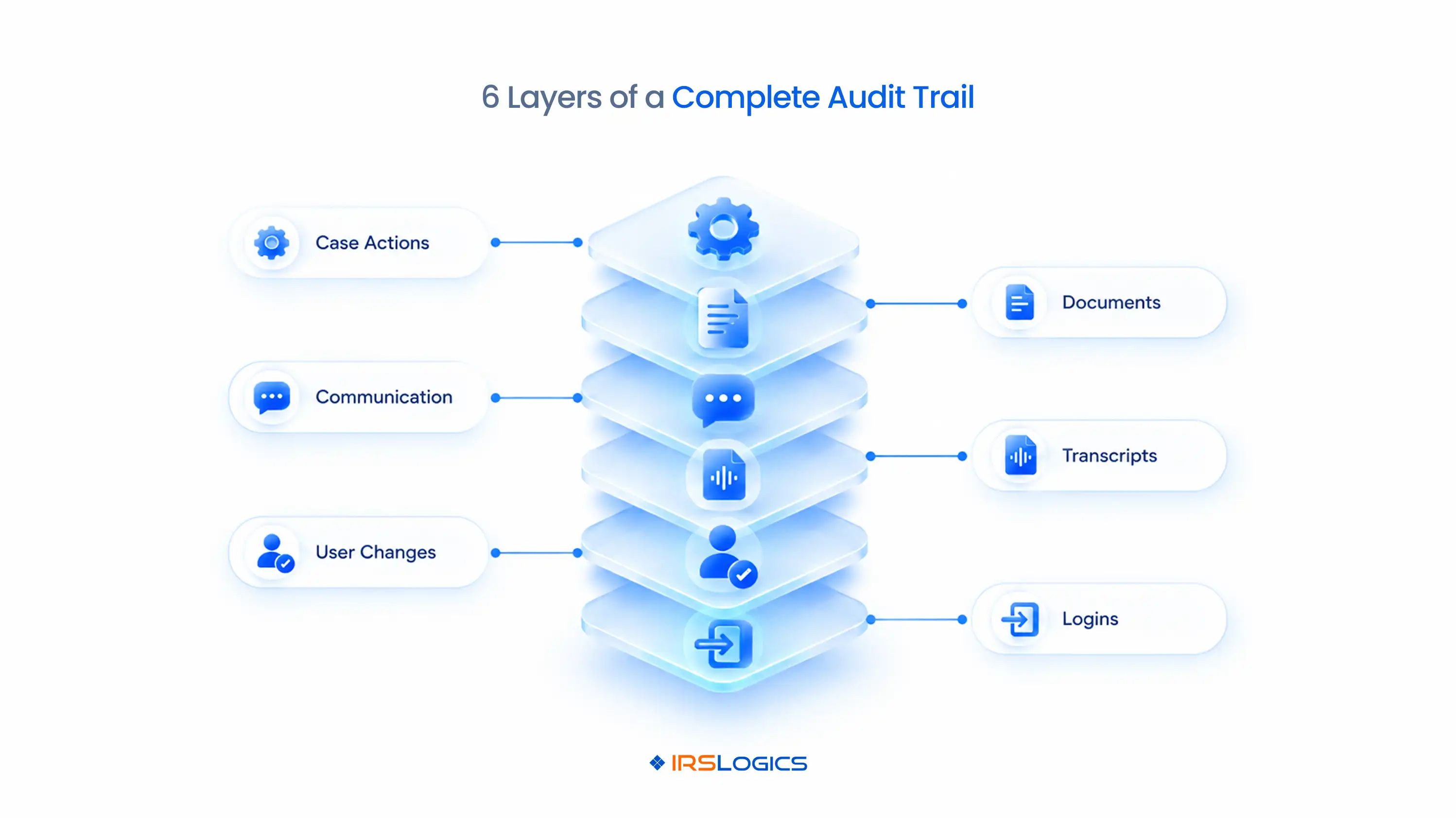
It usually covers four layers:
→ Case activity: Tasks, status changes, notes
→ Documents: Requests, uploads, signatures
→ Communication: Texts, calls, messages
→ Users and access: Logins, role changes, new and deactivated accounts
Tax audit trail software records all of it automatically. Nobody has to remember to write anything down.
That's the whole point. The moment logging depends on someone's memory, it stops being a trail. It becomes a guess.
Because resolution cases are long, messy and full of people.
Here's where a tax case audit trail saves you.
The client dispute.
"You never told me the IRS needed my bank statements."
Your log shows three texts sent over two weeks, with a clean record in the SMS Conversation View.
Conversation over.
The staff handoff.
Your case manager leaves in the middle of an OIC.
The new person opens the tax case audit trail and sees exactly where things stopped.
No guesswork. No starting over.
The IRS follow-up.
"When did we actually submit the 433-A?"
The answer takes seconds, not a hunt through someone's sent folder.
The billing question.
"I already paid that."
The payment log shows which payment went to which invoice, and when.
Memory fades. Logs don't.
Not all audit trails are created equal.
Some log only logins. Some log only notes. Neither is enough.
Here's the full picture:
That transcript row is easy to underestimate.
When you're building strategy on IRS data, you need to know exactly when it was pulled. More on how IRS transcripts drive tax resolution cases.
If your audit trail software for tax firms misses any of these layers, you've got a trail with holes in it.
Resolution cases run on documents:
And documents are exactly where things go missing.
→ Attachments get buried in email.
→ Nobody knows which version is the latest.
→ "Did they ever send the March statement?" becomes a 20-minute search.
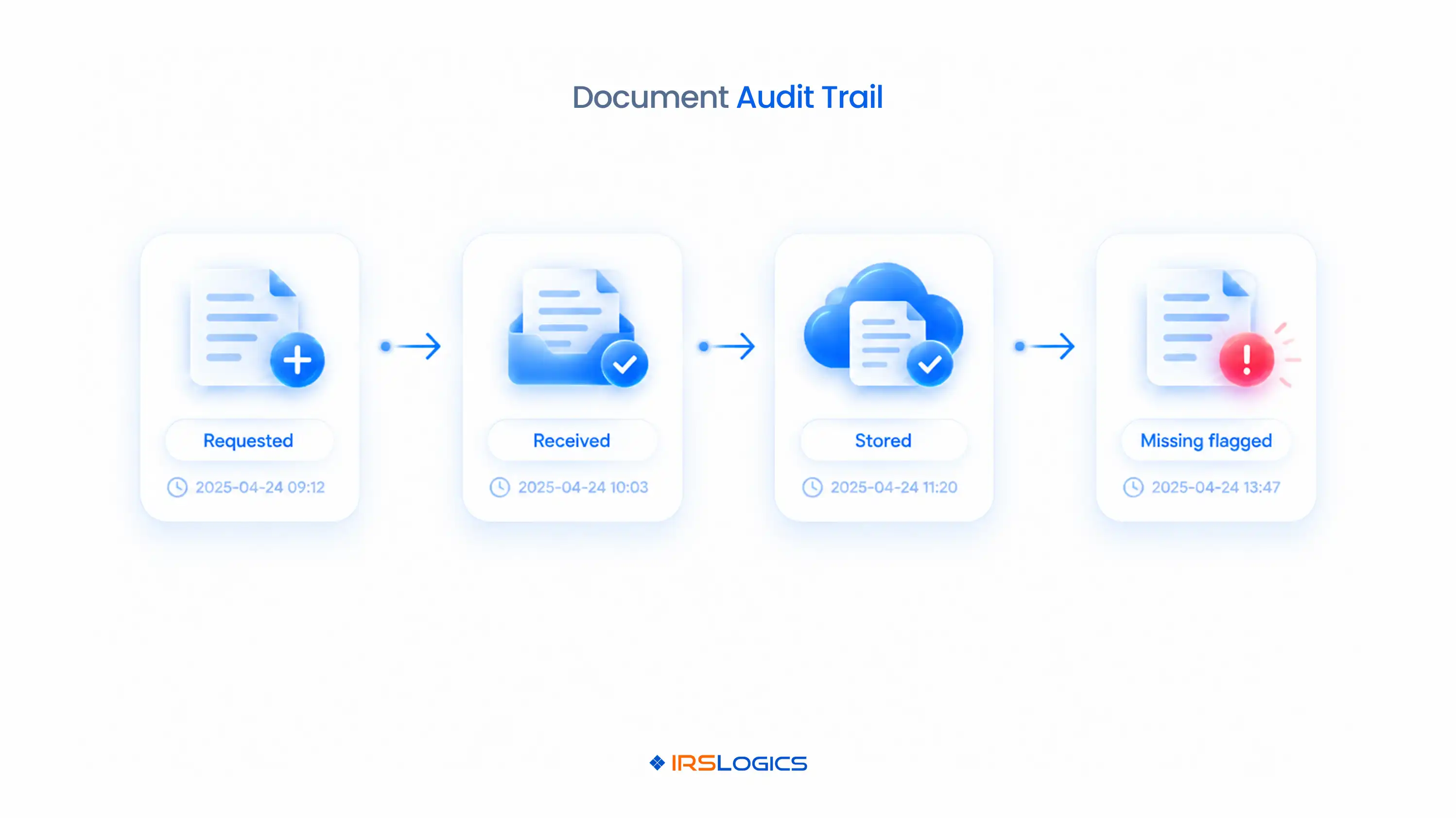
A document audit trail answers four questions instantly:
The Document Collection Tab handles this by tracking the status of every document request, so the case record shows what's in and what's still outstanding.
Here's the difference in one line.
Without a document audit trail: "I think they sent it." With one: "Uploaded March 14, stored under Bank Statements."
That's the kind of certainty a strong document audit trail gives your whole team.
Tax professionals hold some of the most sensitive data there is. Social Security numbers. Bank accounts. IRS debt.
That comes with responsibilities.
→ The FTC Safeguards Rule applies to tax preparation firms and expects them to monitor the activity of authorized users.
→ The IRS's Publication 5708 on creating a written information security plan walks tax practices through building one.
→ If something does go wrong, the IRS data theft guidance for tax professionals explains what to do next, and you'll need to know what was accessed and by whom.
This is where tax compliance tracking gets practical.
Picture this. Login History shows a login at 2 am from an IP address nobody recognizes.
That's not paranoia. That's your early warning.
Tax compliance tracking also works internally. It shows whether your own procedures are being followed: cases moving through the right stages, tasks completed on time, and access limited to the right people.
Audit trail software for tax firms doesn't replace your security plan. It proves your security plan is actually working.
And that's what separates real tax audit trail software from a notes field.
Quick honesty check.
→ Case notes live in personal notebooks
→ Client texts come from personal phones
→ Documents sit in email inboxes
→ Team members share one login
→ Nobody can say who changed a colleague's permissions last month
If two of these sound familiar, your firm is one client dispute away from a very bad week.
Generic tools make this worse. A general CRM might log a note, but it won't tie that note to an IRS case stage, a transcript pull or a signed 2848. Here's why a tax resolution CRM beats a general CRM for exactly this reason.
Desktop setups have the same problem, with files scattered across machines and no central log. That's a big reason firms move to cloud-based tax resolution software.
The fix isn't more discipline. It's tax audit trail software that logs everything by default.
IRSLogics is resolution software with tax audit trail software built into every layer of the platform.
It isn't a separate tool you have to remember to update.
Logs build automatically as your team works, giving you a complete tax case audit trail on every client without anyone doing extra admin.
Here's how that plays out when a case manager leaves in the middle of an OIC.
The new case manager opens the case, and Case Activities shows every status change, task and note.
The Document Collection Tab shows which statements are in and which are still missing.
SMS Logs and Phone Logs show when the client was last contacted.
Transcript Logs show when the IRS data was last pulled, so they know whether to re-pull before submission.
On the admin side, the Audit Trail shows the former manager's account deactivated the same day, and Login History confirms no access after that.
Roles control who sees what going forward.
The case moves on without missing a beat, all the way through your tax representation software workflow to a final tax settlement.
That's what practical audit trail software for tax firms looks like: not a compliance report you dread, but a record that keeps your cases moving. Users rate IRSLogics 93% for quality of support and 94% for ease of doing business with, and it has served resolution professionals for over a decade as purpose-built tax CRM software.
It's software that automatically logs activity inside a tax firm, including case actions, document uploads, communication, logins and user changes. It creates a timestamped record of who did what and when.
A complete tax case audit trail covers tasks, status changes, notes, document requests and uploads, texts, calls, transcript requests, and user access changes.
Resolution cases depend on documents like bank statements and signed authorizations. A document audit trail shows exactly what was requested, received and stored, which settles disputes fast.
Yes. Even solo practitioners handle sensitive client data and long-running cases. Audit trail software for tax firms protects you in disputes and helps show data security practices.
It shows who accessed client data and when, which supports monitoring expectations under the FTC Safeguards Rule. Tax compliance tracking also confirms that internal procedures are being followed.
No. An IRS audit is an examination of a tax return. An audit trail is your firm's own record of activity inside its systems.
Yes. Case Activities, Audit Trail, Login History, SMS Logs, Phone Logs and Transcript Logs all record activity automatically as your team works.
In resolution work, what you can prove matters as much as what you did.
The right tax audit trail software gives you proof on every layer: case actions, documents, communication and access. It makes handoffs painless, disputes short and tax compliance tracking something you can actually show.
A clean document audit trail and a complete case history aren't extra work. With the right tax audit trail software, they're simply how your firm runs.
Ready to prove every step on every case?
→ Book a free demo of IRSLogics
→ Rather talk it through? Call us at +1 (866) 386-2444
All
Tax Software
Workflow & Automation
Industry News
Resolution Tips
Tax Resolution Marketing

Lorem ipsum dolor sit amet, consectetur adipiscing elit. Suspendisse varius enim in eros elementum tristique. Duis cursus, mi quis viverra ornare, eros dolor interdum nulla, ut commodo diam libero vitae erat. Aenean faucibus nibh et justo cursus id rutrum lorem imperdiet. Nunc ut sem vitae risus tristique posuere.


Share this article directly by email. Simply enter the recipient’s details below.

Article has been send to you.