Workflow & Automation


If you have ever submitted the wrong authorization form and had to restart a case from scratch, you already know why this matters. Form 8821 and Form 2848 look similar on the surface. They are both IRS authorization documents. They both require client signatures. But they do completely different things, and using one where the other is required will stall your case or, worse, expose your client to gaps in representation.
This guide breaks down exactly when to use each form, what each authorizes, and how resolution firms handle them efficiently at scale.
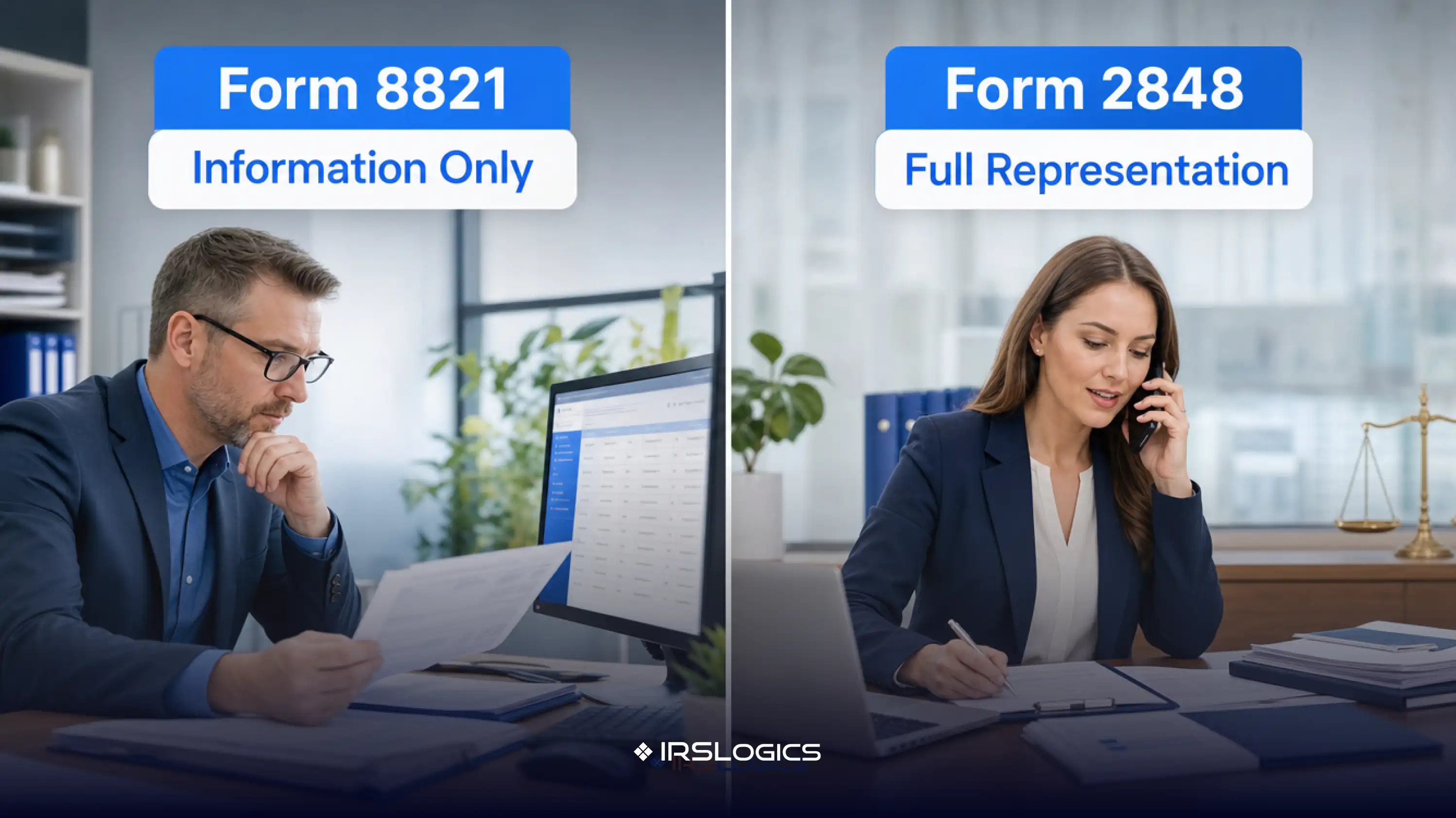
Form 8821 is a Tax Information Authorization. It gives a designated person, typically a CPA, EA, or attorney, the right to receive and inspect a client's IRS tax information for specified years and tax matters.
That is it. Inspection only.
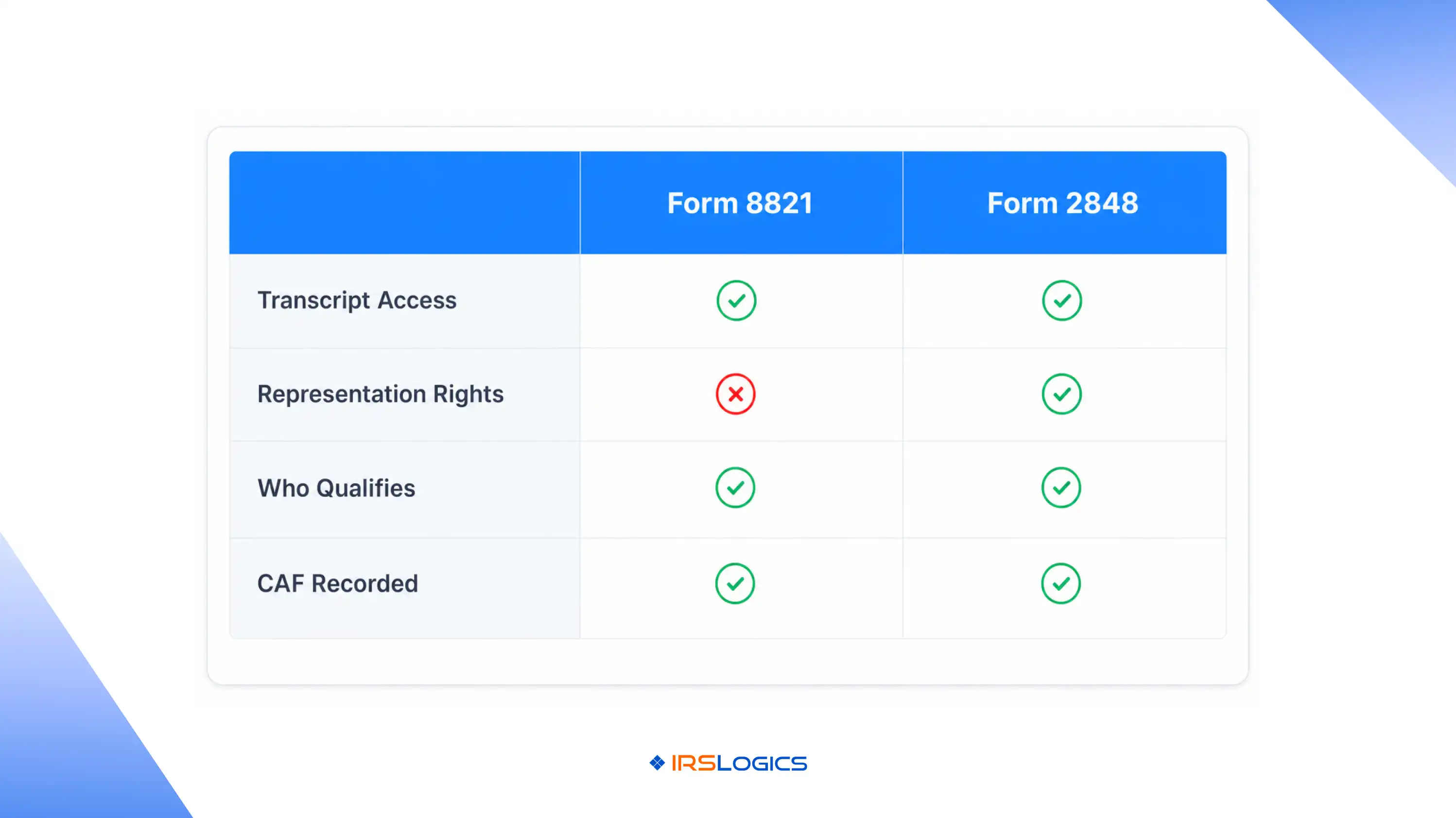
The designee can pull transcripts, review notices, and access account history. But they cannot represent the client in front of the IRS, respond to a collections notice on their behalf, or negotiate a resolution. Form 8821 is a read permission, not a practice permission.
It is processed through the IRS Centralized Authorization File (CAF) system, which means it is on record and associated with the client's taxpayer identification number. It does not expire unless a date is specified.
Common uses in a resolution practice:
Form 2848 is a Power of Attorney and Declaration of Representative. This is the authorization that actually lets a qualified professional act on a client's behalf before the IRS.
That word, act, is what makes it different.
With Form 2848, an EA, CPA, or tax attorney can respond to IRS notices, negotiate installment agreements, file offers in compromise, attend hearings, and make binding decisions during collections proceedings. The representative must be authorized to practice before the IRS, which means not every person on your team qualifies.
The form specifies:
It also flows into the CAF system, but with full representation rights attached. The IRS will deal directly with the representative of record.
The simplest way to remember it: Form 8821 lets you see. Form 2848 lets you act.
One important nuance: Form 8821 does not require the designee to be a licensed practitioner. That makes it useful for delegating read access to paralegals or case managers during intake, without granting them representation rights they are not qualified to hold.
For a deeper look at how the IRS processes both forms online, the IRS online submission portal for Forms 2848 and 8821 is the authoritative reference on processing timelines and e-signature requirements.
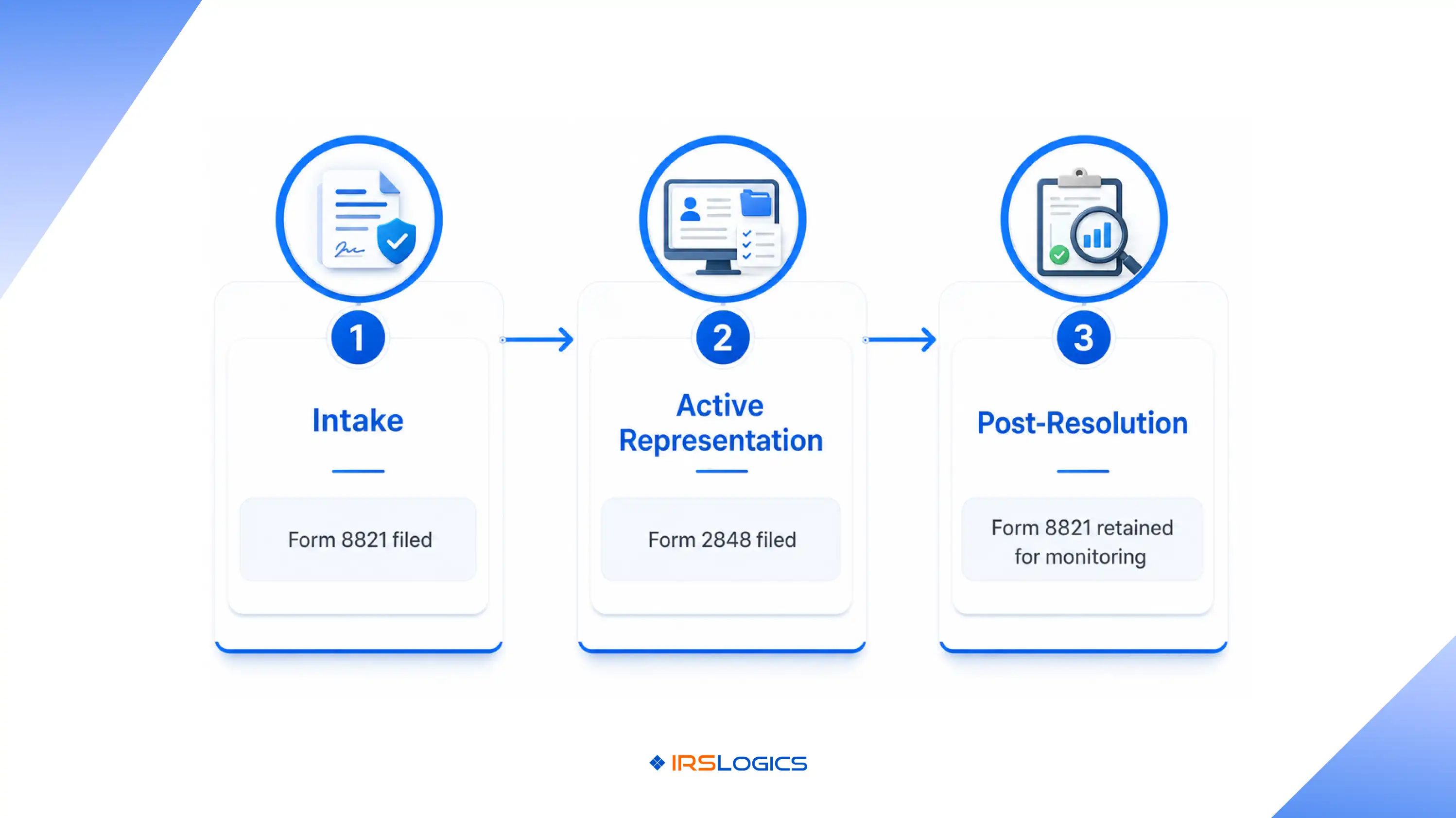
In a real resolution workflow, you will often use both forms at different stages of the same case.
Stage 1: Intake and diagnosis
Many firms file Form 8821 first. It provides you with transcript access quickly, allowing you to assess the client's full IRS account situation, including CSEDs, unfiled years, penalties, and active liens or levies, before the formal engagement agreement is signed. Firms that use IRSLogics pull those transcripts directly from inside the client case record through the platform's built-in transcript retrieval tool, with no separate portal login required.
Stage 2: Active representation
Once the engagement is signed and you are moving into negotiation, whether that is an OIC, a CNC request, an installment agreement, or a penalty abatement appeal, Form 2848 is required. You cannot respond to an IRS collections officer or file a Form 433-A on behalf of a client without it.
Stage 3: Post-resolution monitoring
After a case closes, some firms retain Form 8821 authorization to monitor the client's account for new assessments or compliance failures. This is a way to stay ahead of issues before they become crises, without maintaining a full POA relationship.
The National Association of Enrolled Agents offers practice guidance on authorization management that is worth reviewing if your firm handles high-volume resolution cases and needs to formalize its procedures.
Knowing the difference on paper is one thing. Executing cleanly across dozens of active cases is another.
Filing 8821 when 2848 is required. This happens when case managers submit the first authorization form in their template folder without checking the case stage. The result: the IRS will not accept the firm's representative on a collections matter, and the client may receive notices without anyone authorized to respond. Understanding where each form fits in the broader case workflow is exactly what separates a purpose-built tool from a generic one, and it is the distinction covered in detail in this breakdown of tax resolution CRM vs general CRM.
Incorrect tax years or matter codes. Both forms require specific tax years and matter types to be listed. A blanket authorization without the right scope will be rejected or limited by the CAF system.
Forgetting to revoke prior authorizations. When a client switches firms, or when your firm takes over from a previous preparer, Form 2848 must explicitly revoke the old authorization unless you want the previous representative to retain access.
Relying on paper filing when electronic submission is faster. The IRS online portal for Forms 2848 and 8821 processes submissions significantly faster than paper mail. Firms that still fax these forms are adding unnecessary lag to every case.
The American Bar Association Tax Section publishes guidance on IRS practice and procedure that covers authorization issues in detail, particularly useful for tax attorneys managing complex representation matters.
Tax resolution firms do not fail on technical knowledge. They fail on execution. Wrong form filed at the wrong stage. Transcripts not pulled before the IRS deadline. Client signatures chased over email for two weeks. IRSLogics is built specifically to close those gaps. Every feature inside the platform maps to a real stage of the resolution case lifecycle, which means authorization workflows, transcript access, document collection, and client communication are all handled inside one system, not across five different tools that do not talk to each other.
When a new case opens, the IRS transcript pull happens directly from the client case record through IRSLogics' built-in transcript retrieval tool, with no separate IRS portal login and no manual status tracking. Once the engagement is signed and Form 2848 is in place, the Financial Questionnaire sends a fillable intake form to the client, and when they complete it, the data auto-populates into the 433-A, 433-B, and OIC worksheets. Authorization forms and engagement letters are collected through the platform's E-Sign feature directly from the Client Portal, with no printing, no scanning, and no delay. The Document Collection Tab tracks every outstanding document request by status so nothing falls through between intake and active representation.
IRSLogics has been serving tax resolution professionals for over a decade. Across platforms, users rate it 93% for quality of support and 94% for ease of doing business, numbers that reflect what happens when software is built for one specific industry instead of adapted from something general. If your firm handles volume and your authorization workflow still lives in a spreadsheet, book a demo and see how resolution firms run cases end to end inside one platform.
Form 8821 gives you information access. Form 2848 gives you representation rights. Using the right form at the right stage is not just procedural. It determines whether your firm can actually act on a client's behalf when it matters. For firms handling volume, the authorization workflow needs to be as systematized as the casework itself.
Q1. What is the difference between Form 8821 and Form 2848?
Form 8821 only allows access to IRS tax information and transcripts. Form 2848 grants full representation authority, including communicating and negotiating with the IRS on the taxpayer’s behalf.
Q2. Is Form 8821 a Power of Attorney?
No. Form 8821 is strictly a Tax Information Authorization and does not give the designee legal authority to act for the taxpayer.
Q3. Can I use Form 8821 to pull IRS transcripts?
Yes. Many tax professionals use Form 8821 during intake to review transcripts and assess the client’s overall IRS situation before formal representation begins.
Q4. Who can be listed as a designee on Form 8821?
Anyone can be listed, including non-licensed staff members. Unlike Form 2848, the designee does not need professional credentials.
Q5. Should I use Form 8821 or 2848 first?
Most resolution workflows start with Form 8821 for transcript access. Form 2848 is typically filed later once active IRS representation is required.
Q6. What happens if I use Form 8821 when the IRS requires Form 2848?
The IRS will not recognize your firm as the taxpayer’s representative. Communication and collection actions may continue directly with the taxpayer instead.
Q7. Can both forms be limited by tax year and matter type?
Yes. Both forms allow you to specify the exact tax years and issue types covered to avoid unnecessary access or processing issues.
All
Tax Software
Workflow & Automation
Industry News
Resolution Tips
Tax Resolution Marketing

Lorem ipsum dolor sit amet, consectetur adipiscing elit. Suspendisse varius enim in eros elementum tristique. Duis cursus, mi quis viverra ornare, eros dolor interdum nulla, ut commodo diam libero vitae erat. Aenean faucibus nibh et justo cursus id rutrum lorem imperdiet. Nunc ut sem vitae risus tristique posuere.


Share this article directly by email. Simply enter the recipient’s details below.

Article has been send to you.