Resolution Tips


The best tax resolution software for call centers puts lead intake, calling, texting, scripts, and case management in one system.
That matters because a call center does not lose deals on the phone alone.
It loses them in the gaps between the call and the follow-up.
A lead comes in. Nobody calls back in time. The next one is already ringing.
Simple answer first.
Tax resolution software for call centers has to do two jobs at once. It runs the sales floor. And it runs the IRS case after the client says yes.
Most tools do one.
A general sales dialer is great at calls. A practice tool is great at files. Neither knows what a Form 433-A is.
That gap is why firms end up with a lead tool, a texting tool, a billing tool, and a case tool, all arguing about which client is which.
If you are weighing that choice, this breakdown of tax resolution CRM vs general CRM explains where general tools fall short.
Picture a Monday morning.
Forty new leads from three sources. Six agents. One shared spreadsheet.
Agent A calls a lead that Agent B already called. Agent C forgets a callback. The manager asks "which source is working?" and nobody knows.
Honestly, this is not a people problem.
It is a visibility problem.
Here is where leads usually leak:
→ Slow first response after a form fill
→ Uneven lead assignment between agents
→ Follow-up notes living in personal notebooks
→ Texts sent from personal phones
→ No clear view of lead source to signed client
Every one of these is fixable with the right CRM. None of them is fixable with more headcount.
A tax call center CRM should make the next action obvious for every agent, every time.
Not just store contacts.
Here is the checklist.
Leads arrive from forms, partners, and campaigns. Your system should accept all of them without manual retyping.
IRSLogics supports Import Leads manually, through HTTP POST, or via API. Then Lead Distribution assigns leads to agents by the allocation ratio you set.
So the new lead goes to the right person, not the loudest one.
And Sources and Campaign tags where each lead came from, so you can track it later.
Agents should not toggle between four tabs to make one call.
Click to Dial connects RingCentral, Vonage, or Ytel, so calls start from the client record.
Interview Script gives agents a consistent flow for intake calls, so qualification does not depend on who picked up.
For texting, the SMS Conversation View keeps every message in one thread on the client record. When an agent is out, the next one sees the full history.
Templates for email and SMS cut repeat typing.
Tasks and reminders keep callbacks from vanishing.
Mass SMS and Mass Email handle bulk outreach when you need it.
And the Rule Engine builds custom automations around how your floor actually works.
That is what a real call center CRM does.
It takes decisions off the agent and puts them in the system.
You cannot improve what you cannot see.
Most call centers know how many leads came in.
Far fewer know which source turned into signed clients.
Tax resolution software for call centers should answer four questions without a spreadsheet:
In IRSLogics, these map to specific reports:
→ Leads Source Summary shows leads and conversion by source within a date range
→ Sales Summary shows sales performance at a glance
→ Task Summary shows tasks assigned, completed, and pending per employee
→ Commissions Report supports sales payroll
→ Dashboard gives a birds-eye view of leads and sales
Here is the twist.
The best report is the one a manager reads on Monday morning and acts on before lunch.
If it takes three exports to build, it will not get built.
This is where call center tools usually stop.
A signed client is not the finish line.
It is the start of weeks of IRS work.
So the same platform has to carry the case forward:
→ Document Collection Tab to track what the client still owes
→ Financial Questionnaire so answers flow into IRS financial forms
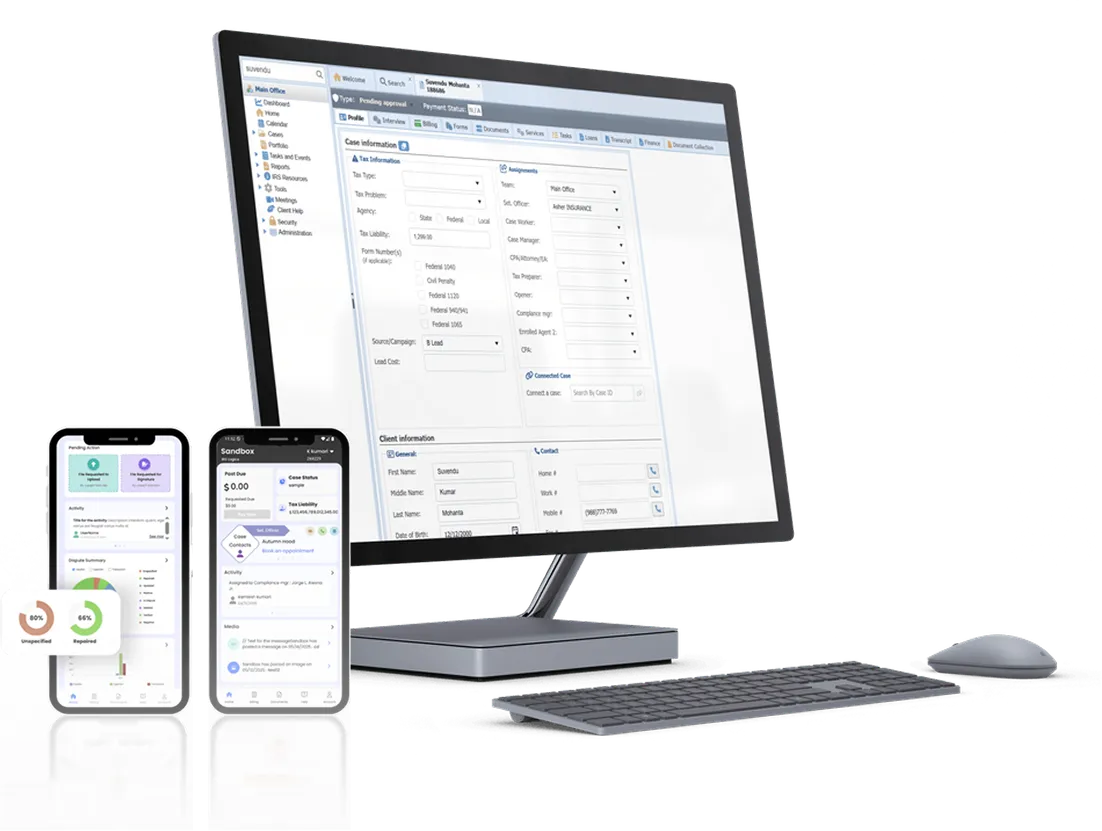
→ Transcripts pulled inside the case record
→ E-Sign for engagement documents
→ Billing with payments tied to invoices
Why does it matter for a call center?
Because the handoff from sales to case management is where promises get lost.
The agent said "we will have your transcripts in days." Then the client is sitting in a different system that nobody on the sales team can see.
One record fixes that. Both teams read the same story.
If you want to see how scheduling fits, this guide on syncing IRSLogics appointments with Google Calendar shows how booked calls land on calendars automatically.
Short version: your software should help, but it cannot do the thinking for you.
Outbound calling and texting come with rules. The FTC publishes guidance on telemarketing rules and Do Not Call, and firms offering debt relief services should read it closely.
Talk to counsel about what applies to your firm.
What software can do is give you records:
→ SMS Logs show messages sent and their status
→ Phone Logs show calls forwarded to call-forwarding numbers on user accounts
→ Audit Trail records account-level changes
→ Login History shows who logged in, when, and from which IP
→ Roles control who can see and do what
Good records do not make you compliant on their own. But without them, you are guessing.
Also keep IRS authorisations in mind. Representation typically involves Form 2848, so your case process should capture it cleanly.
Do not judge by a feature list. Judge by one lead, start to finish.
Ask for a demo that follows a lead from first form fill to a signed, billed case.
Questions worth asking:
This list of tax resolution software demo questions is a good prep tool.
And if you are still comparing categories, this overview of tax CRM software is worth a read.
IRSLogics is built only for tax resolution. So the sales floor and the case team work in one system, not two.
Here is how it looks on a normal day:
→ New leads come in through Import Leads and get assigned by Lead Distribution
→ Agents call through Click to Dial and follow the Interview Script
→ Follow-ups run through Templates, Tasks, and the SMS Conversation View
→ Managers read Leads Source Summary and Sales Summary to see what converts
→ After signing, the client completes the Financial Questionnaire and answers flow into the IRS forms
→ Billing teams use payments tied to invoices to see what is unpaid
→ Transcripts are pulled in the case record, as covered in this guide to IRS transcripts for tax resolution
That is tax resolution software for call centers working the way a call center actually runs.
Click here to get a quote and see how it fits your floor.
It is a platform that manages lead intake, calling, texting, and sales tracking, then carries the signed client into IRS case management in the same system.
It is a CRM built for high-volume tax sales teams. It assigns leads, supports calling and texting, and reports conversion by source and agent.
Yes. Lead Distribution assigns leads based on the allocation ratio you set.
Click to Dial integrates RingCentral, Vonage, and Ytel, so agents can call from the client record.
Leads Source Summary shows leads and conversion by source within a date range.
No. It gives you records like SMS Logs, Phone Logs, and Audit Trail. Compliance still depends on your process and legal advice.
It cannot carry IRS forms, transcripts, or case billing, so the client moves to another system after signing.
A call center wins on speed, consistency, and follow-through. The right tax resolution software for call centers gives every agent the next step, every manager the numbers, and every client one clear record. A strong tax call center CRM turns a busy floor into a predictable one.
Questions? Call us at +1 (866) 386-2444.
Book a demo and see how IRSLogics runs your leads, calls, and cases in one place.
P.S. How many tools does your team open before making one sales call?
All
Tax Software
Workflow & Automation
Industry News
Resolution Tips
Tax Resolution Marketing
Lorem ipsum dolor sit amet, consectetur adipiscing elit. Suspendisse varius enim in eros elementum tristique. Duis cursus, mi quis viverra ornare, eros dolor interdum nulla, ut commodo diam libero vitae erat. Aenean faucibus nibh et justo cursus id rutrum lorem imperdiet. Nunc ut sem vitae risus tristique posuere.


Share this article directly by email. Simply enter the recipient’s details below.

Article has been send to you.