Tax Software


You've probably sat through a software demo that looked incredible.
Clean UI. Impressive slide deck. A sales rep who knows every answer.
And then your team starts using it.
The multi-user workflow breaks down. Reviews pile up with no clear owner. Client intake is still a mess of emails and spreadsheets. And the tool you paid for is just sitting there, half-adopted.
That's the gap most comparisons of tax preparation software for professionals never talk about. They cover features. They skip the friction.
This guide is about the friction. Specifically: what to look for in review workflows when multiple team members are working a case, how to run a proper diagnostic before switching platforms, and a client intake checklist that actually maps to how tax resolution firms operate.
Here's a scenario that happens constantly in tax resolution firms.
A case manager pulls the IRS transcript, updates the client profile, and flags the case for partner review. The partner doesn't see it because reviews are tracked in a shared Google Sheet nobody updates consistently. The client calls asking for an update. Nobody has one.
This is not a people problem. It's a workflow problem. And most tax preparation software for professionals isn't built to solve it.
A proper multi-user review workflow requires three things working together:
Without these, you're managing the software. The software is not managing the case.
Platforms like TaxDome and Canopy offer solid multi-user functionality, but they're built for general tax practice management. The review logic isn't mapped to IRS case stages like OIC review, installment agreement submission, or CSED tracking. When those case stages matter, general workflow tools start showing gaps.
In a purpose-built resolution platform, the review workflow follows the case lifecycle. A task set for transcript review connects to the transcript log. A billing review connects to the invoicing module. Nothing is siloed.
The phrase "professional tax software" means different things to different people. To Drake or TaxAct, it means fast and accurate return preparation. To a tax resolution firm, it means something entirely different.
Resolution professionals are not filing returns. They're working IRS cases. Form 433-A. OIC eligibility analysis. Transcript pulls. Lien and levy negotiations. Client financial questionnaires. That's a different category of work, and it needs different tooling.
The mistake most firms make when evaluating software is comparing feature lists instead of workflow maps. A feature list tells you what the software can do. A workflow map tells you how your team will actually move through a case from intake to resolution.

When a new client comes in with IRS debt, your platform should handle:
If any of those steps requires your team to leave the platform, open another tool, or re-enter data somewhere else, that's not a workflow. That's a workaround.
The question of how to sync appointments between your resolution platform and Google Calendar touches on this directly. When appointment booking through the client portal automatically appears in Google Calendar, one less thing falls through the cracks. That's the kind of integration that matters, not the kind that looks good in a feature comparison.
Switching tax preparation software mid-year is painful. Switching to the wrong platform is worse.
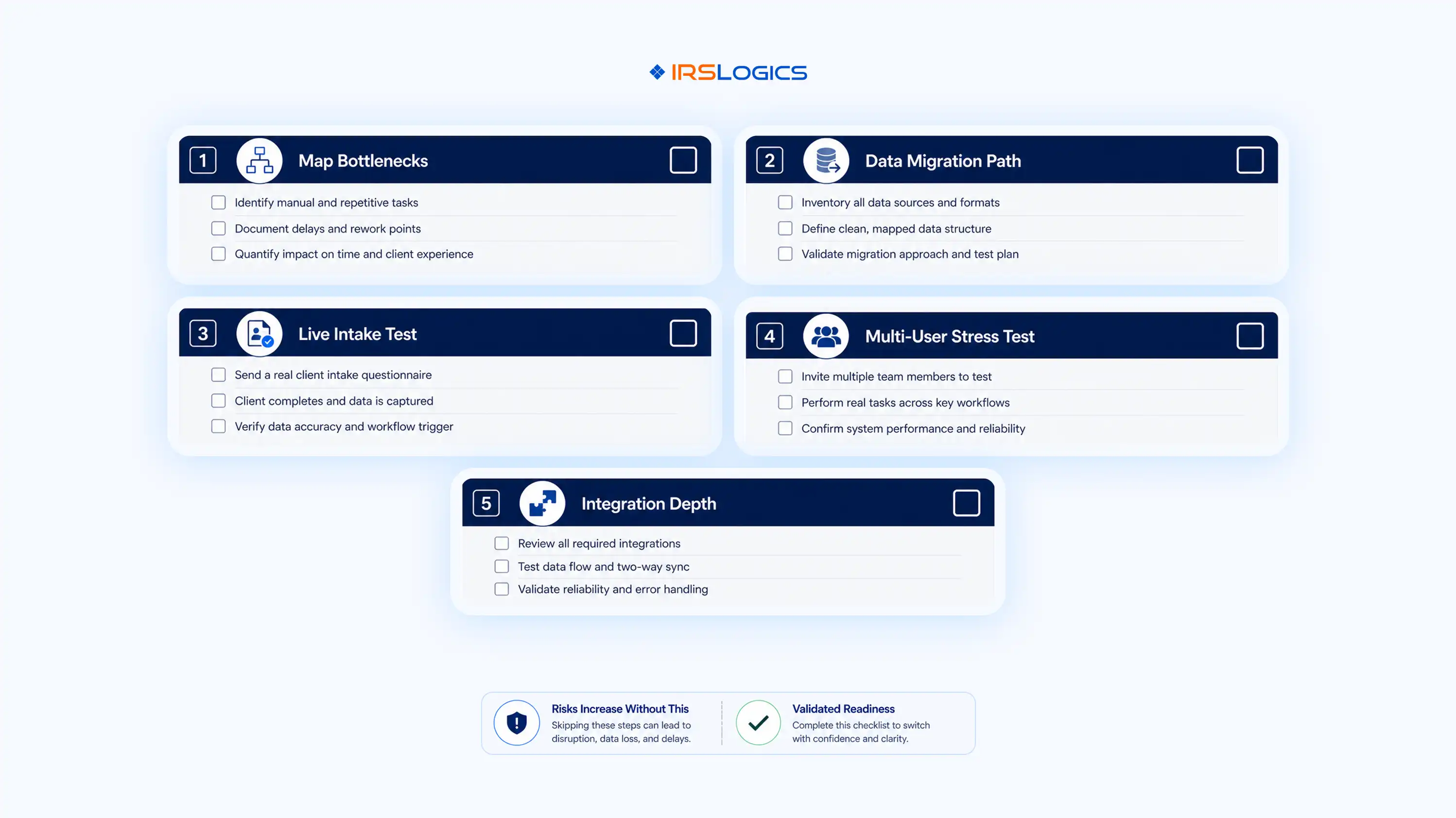
Before committing to any platform, run this diagnostic with your team.
Where do cases stall? Most firms identify the same three places: client document collection, billing reconciliation, and internal review handoffs. Any new platform needs a clear solution for each of these, not just a feature that sounds related.
Can you bring your existing client records in cleanly? What's the format? What's the support process? Platforms that charge for data migration or make it deliberately difficult are worth flagging early.
Before signing a contract, ask for a live demo that walks through a real client intake. Start with the financial questionnaire. Watch how the data flows from client submission into the relevant IRS forms. If the demo skips that step, push for it.
The most important thing to watch: does the client's financial data auto-populate into the 433-A and OIC worksheets, or does someone on your team still have to key it in? That one workflow step represents hours of admin time per case.
Log in as three different users simultaneously. Assign a task. Update a case note. Pull a transcript. Watch what happens to the activity log. If the audit trail is incomplete, or if users can overwrite each other's work without visibility, that's a real operational risk.
A platform that "integrates with Google Calendar" could mean anything from a deep two-way sync to a manual export link. Verify exactly what the integration does. The same applies to iSoftPull for credit report pulls, click-to-dial integrations, and mass SMS or email capabilities.
The IRS's own guidance on Transcript Delivery System access for practitioners provides context on what secure, compliant transcript retrieval should look like. Make sure any platform you evaluate meets those standards natively, not through a workaround.
Here's something most software reviews skip entirely: what actually needs to happen before a resolution firm can start working a case.
This isn't a feature checklist. It's what your platform needs to support, end to end.
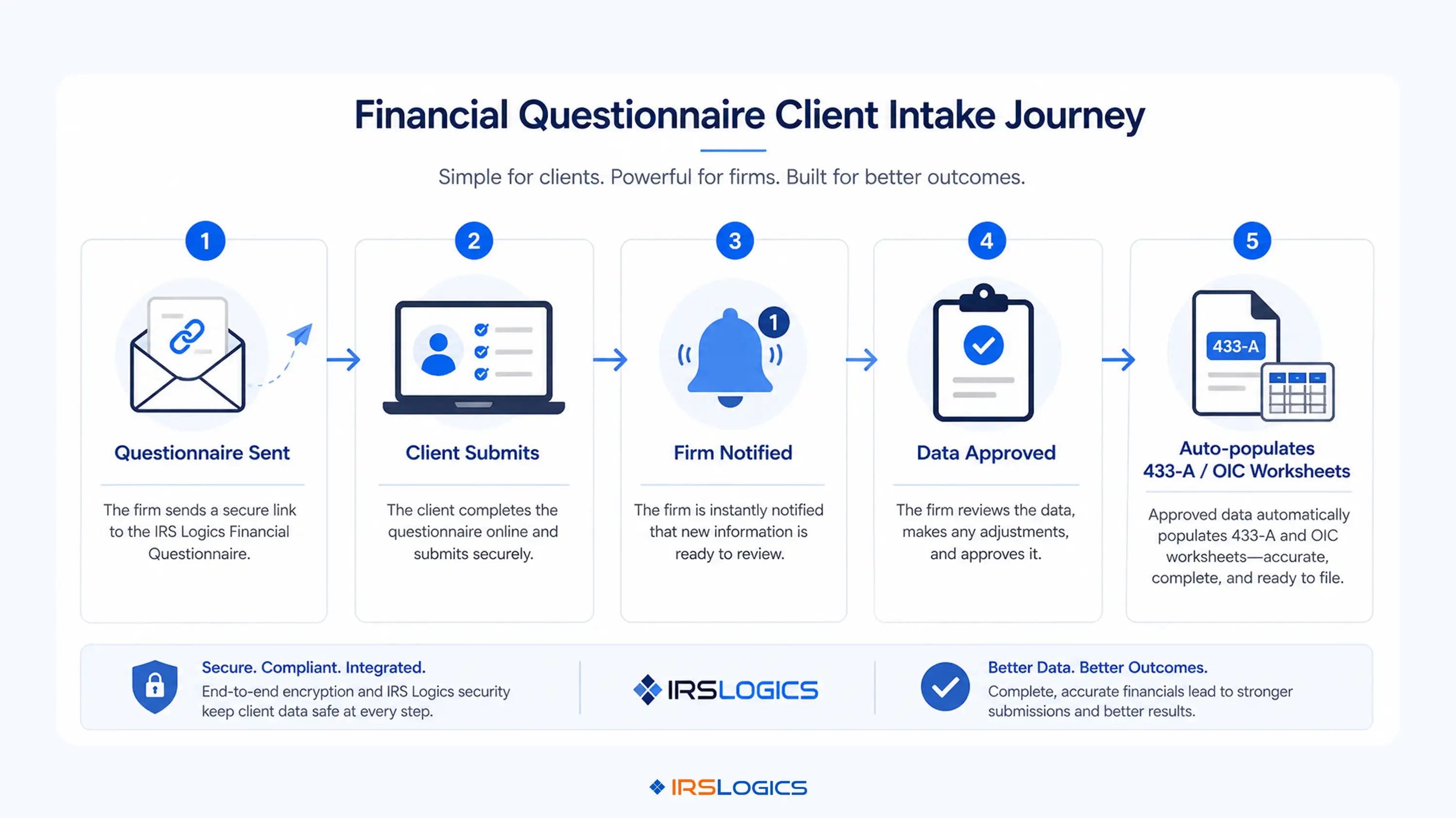
Before the First Client Call
During the Interview
Document Collection Phase
Before Filing Any Resolution Request
If your current platform cannot support each of these steps without your team switching tools, that's the gap a new platform needs to close.
The National Association of Enrolled Agents publishes practice standards that inform what a compliant client intake process should include. Any software claiming to serve EAs should map to those standards directly.
The earlier post on how the Document Collection Tab works inside a resolution platform walks through how that intake phase actually functions. The short version: document status tracking by case, by client, and by firm location changes the intake experience entirely.
If you're evaluating tax preparation software for professionals and your practice includes resolution work, this is the section that matters most.
General tax preparation tools are optimised for volume. They're built to help a preparer move through as many returns as possible, as fast as possible. The UX reflects that. The workflow reflects that.
Resolution work doesn't scale the same way. One OIC case might involve six months of client contact, three rounds of IRS correspondence, multiple form iterations, and ongoing billing. The software needs to hold that case together over time.
Here's what to look for that prep-focused platforms typically don't offer:
The AICPA's resources on practice technology selection offer a useful framework for evaluating software against the demands of complex, ongoing client relationships rather than transactional tax prep. Resolution work fits squarely in the complex category.
Pitbull Tax and IRS Solutions are the most direct competitors in the resolution software space. Both offer strong OIC tooling. Where purpose-built resolution platforms differentiate is on the end-to-end case lifecycle: intake through billing, with a client portal and integrations that eliminate the need for separate tools.
The workflow gaps this blog describes, scattered intake, disconnected billing, manual data re-entry, review steps that fall through the cracks, are the exact problems IRSLogics was built to close.
IRSLogics is a purpose-built tax resolution platform designed for CPAs, enrolled agents, and tax attorneys who manage IRS cases from intake to final resolution. The client's financial questionnaire auto-populates directly into Form 433-A, 433-B, and OIC worksheets. Transcripts are pulled and logged inside the case record. Document requests go out through a structured workflow with status tracking. Billing is tied to individual cases and individual invoices, so your accounts receivable picture is accurate without cross-referencing a separate system.
The multi-user review workflow is built around how resolution cases actually move. Task assignment, case activity logs, and review states are connected to the case lifecycle, not managed in a spreadsheet alongside it.
If your practice handles resolution work and your current platform is making your team work around it rather than through it, explore the full feature set or view plans and pricing to see what fits your firm.
What is the best professional tax preparer software?
Depends on your work. Prep tools like Drake and Intuit ProConnect suit volume, but resolution work needs software built for cases, not just filing.
How much does professional tax preparation software cost?
Pricing varies by tool and team size. The bigger cost is inefficiency when your software cannot handle your full workflow.
What software do professional tax preparers use?
Most firms use a mix. Prep tools for filing, and resolution platforms for managing cases and client workflows.
What tax software does the IRS recommend?
The IRS does not recommend specific software. It only requires compliant access to transcripts and proper data security standards.
Can a multi-user tax team work effectively from a single platform?
Yes, if the system supports it. Without roles, tracking, and accountability, teams end up with confusion and missed steps.
What should a client intake process look like in a resolution firm?
Everything should happen in one place. Intake, documents, transcripts, signatures, and billing need to be connected and trackable.
Is it worth switching tax software mid-year?
Usually no. Only switch if your current system is actively breaking your workflow, otherwise plan it after peak season.
Choosing tax preparation software for professionals is not a feature decision. It's a workflow decision.
The firms that get it right aren't the ones with the longest feature checklist. They're the ones whose team can move a client from intake to resolution without switching tools, re-entering data, or losing visibility on where the case stands.
Quick recap:
If you're evaluating platforms for a tax resolution practice, see IRSLogics in action. Book a free demo and walk through a live case workflow with someone who knows the resolution space.
All
Tax Software
Workflow & Automation
Industry News
Resolution Tips
Tax Resolution Marketing

Lorem ipsum dolor sit amet, consectetur adipiscing elit. Suspendisse varius enim in eros elementum tristique. Duis cursus, mi quis viverra ornare, eros dolor interdum nulla, ut commodo diam libero vitae erat. Aenean faucibus nibh et justo cursus id rutrum lorem imperdiet. Nunc ut sem vitae risus tristique posuere.


Share this article directly by email. Simply enter the recipient’s details below.

Article has been send to you.