Workflow & Automation


Most tax resolution cases hit the same wall early on.
You need IRS transcripts. You need account history. You need to understand exactly what your client owes, when the CSED clock started ticking, and whether there are active levies or liens. And you cannot get any of it without proper authorization in place.
That is where the 8821 form comes in. For enrolled agents, CPAs, and tax attorneys working resolution cases, Form 8821 is not just a piece of paperwork. It is the key that unlocks the IRS data your entire case strategy depends on.
This blog walks through how Form 8821 actually works inside a resolution practice, where it fits into your workflow, how it compares to Form 2848, and how platforms built for resolution work handle the entire authorization-to-transcript process in one place.
Form 8821, Tax Information Authorization, gives a designated third party the right to receive and inspect a taxpayer's confidential IRS information.
That third party is typically you. The EA, CPA, or tax attorney hired to resolve the client's IRS problem.
With a valid Form 8821 on file, you can access IRS transcripts, account history, notices, and return information for the tax periods and form types you specify. The IRS logs it on the Centralized Authorization File (CAF), which means agents can verify your authorization over the phone.
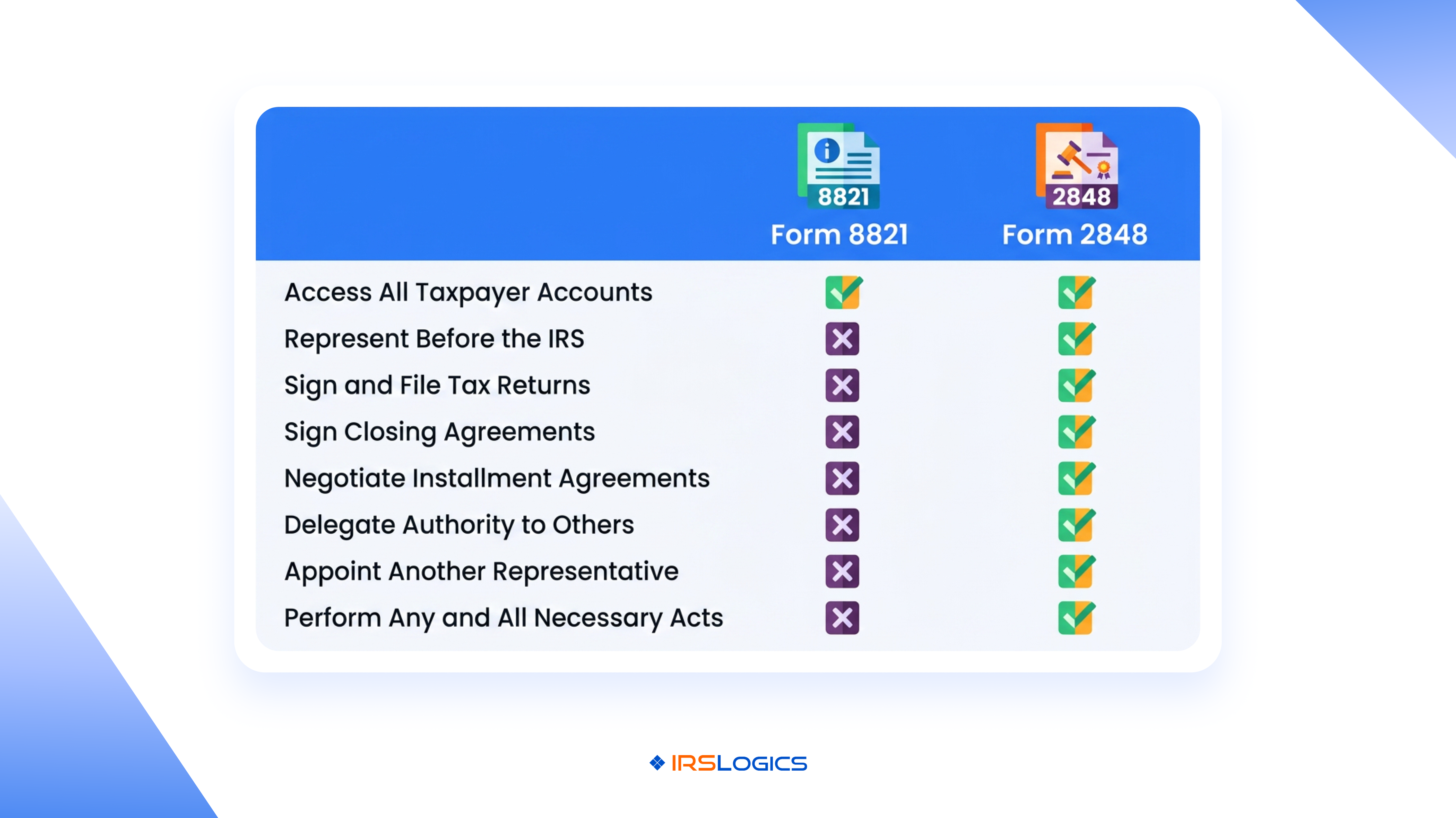
What Form 8821 does not do: it does not let you represent the client before the IRS, negotiate on their behalf, or make decisions for them. It is a read-only authorization. You can look, but you cannot act.
For resolution cases, that distinction matters a great deal.
This is the question that comes up constantly, and the answer is simpler than it sounds.
Form 2848, Power of Attorney and Declaration of Representative, authorizes you to represent the taxpayer before the IRS. You can communicate with IRS agents, negotiate installment agreements, submit OIC applications, and advocate on the client's behalf. It also grants transcript access.
Form 8821 only authorizes information access. You receive and review IRS data. You do not represent the client.
So when do you use each one?
Form 8821 is useful early in a case, during intake and assessment, when you need IRS data to evaluate the situation before formally entering representation. It is also used by lenders, financial institutions, and third parties who need to verify tax information without any representative role.
Form 2848 is what most resolution practitioners file once they are ready to actively work the case. Many firms file both at intake. The 8821 gets you data access immediately while the 2848 processes through the CAF system, which typically takes five to ten business days.
Knowing which to file when is not just a procedural detail. It affects how quickly you can move on a case.
In a resolution practice, Form 8821 shows up at a few specific moments.
During initial intake. Before you commit to representing a client, you need to know what you are walking into. Filing Form 8821 at intake lets you pull transcripts and review account history without triggering full POA status. It is especially useful for pre-screening OIC eligibility or assessing how aggressive the IRS has been on the account.
When a third party needs access. If a lender is financing the client's resolution fees, or if a financial institution needs to verify tax compliance, Form 8821 gives them read access without giving them any representative authority.
For specific tax periods or form types. The form lets you designate exactly which tax periods and which forms you want access to. You are not granting blanket authorization. You can keep it narrow.
Form 8821 also has no expiration date unless you specify one. It stays active until you revoke it or the taxpayer revokes it. That is worth knowing when you are managing long-term cases.
The form itself has six sections. Here is what each one requires.
Section 1: Taxpayer Information. Name, TIN (SSN or EIN), address, and phone number of the client.
Section 2: Designee Information. Your name, address, CAF number, PTIN, phone, and fax. If you are filing on behalf of a firm, the firm's information goes here.
Section 3: Tax Information. This is where you specify exactly what you want access to: the type of tax (Form 1040, 941, etc.) and the specific years or periods. Be precise. Vague or overly broad entries slow processing.
Section 4: Specific Use Not Recorded on CAF. If this is a one-time use authorization not intended for the CAF file, check this box. Most resolution practitioners leave this blank so the authorization is recorded and accessible.
Section 5: Retention or Revocation of Prior Authorization. If you are replacing an existing Form 8821, this section handles that transition.
Section 6: Taxpayer Signature. The client must sign and date. Electronic signatures are permitted under current IRS guidance on e-signatures, which makes this significantly easier for firms managing high client volumes.
Submission options: mail, fax, or through the IRS's Tax Pro Account for eligible practitioners.
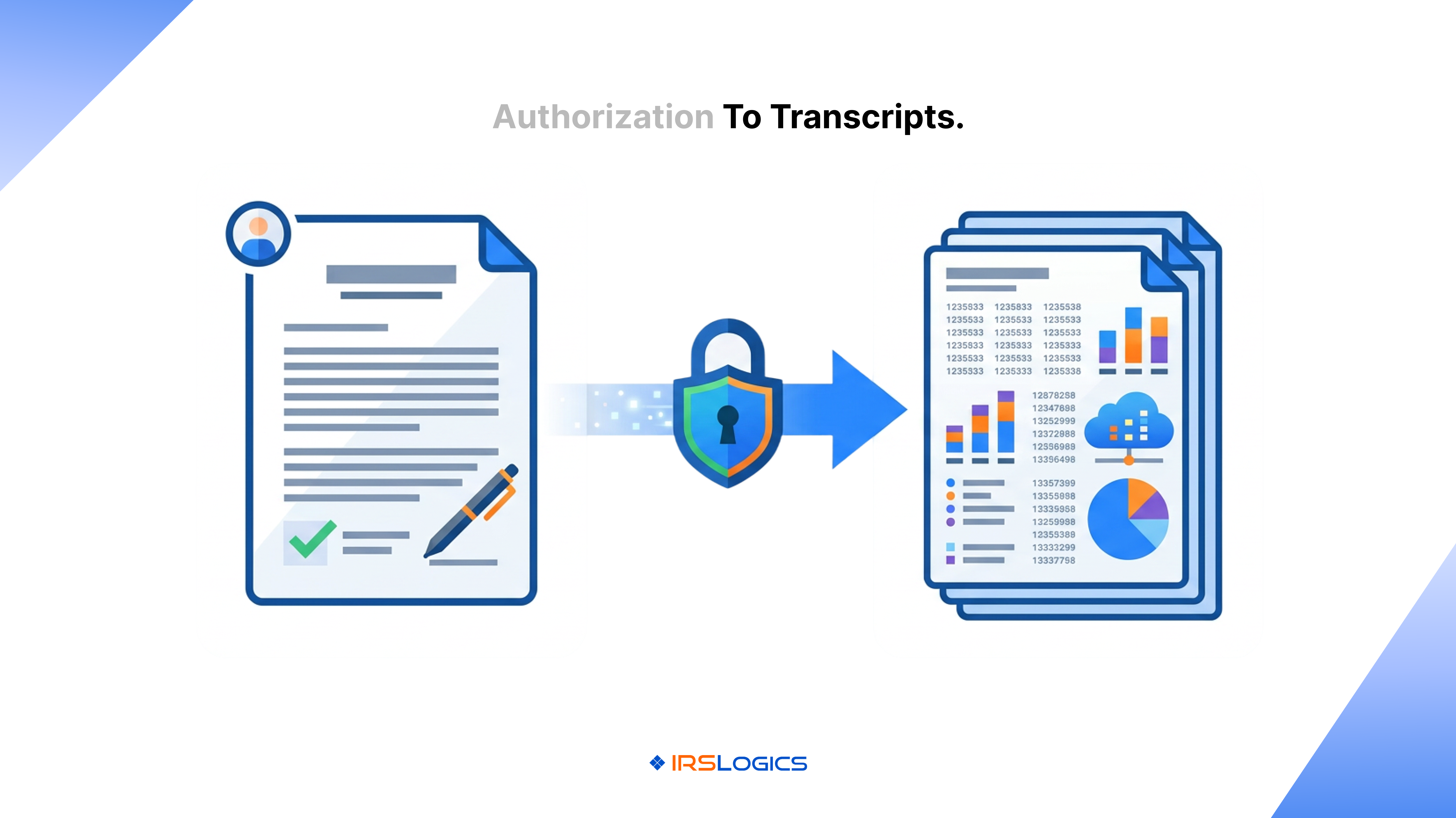
Once the form is submitted and processed, the authorization is recorded on the CAF system. IRS representatives can verify it when you call. Transcript access becomes available through the IRS Transcript Delivery System (TDS).
Standard processing runs five to ten business days for mailed submissions. Fax is faster, typically two to three days. Online filing through the Tax Pro Account is the quickest option for practitioners who have it set up.
One common frustration: even with Form 8821 on file, pulling transcripts through the IRS TDS portal requires logging into a separate system, tracking request statuses manually, and storing results somewhere accessible for the case team. For firms managing dozens of active cases, that process adds up.
This is where the workflow either holds together or falls apart.
Most general CRM and practice management tools treat Form 8821 as a document to store. Resolution-specific platforms treat it as the beginning of a case workflow.
Inside IRSLogics' transcript management system, practitioners initiate transcript requests directly from the client's case record. The request is logged automatically in Transcript Logs, and the transcript populates into the case when retrieved. Nothing gets stored on a personal drive or tracked in a separate spreadsheet.
When the Financial Questionnaire feature is sent to a client alongside the 8821 form at intake, the client fills in their financial information, and that data auto-populates directly into IRS forms including the 433-A and OIC worksheets. The manual re-entry that typically costs an hour per case disappears.
The Document Collection Tab handles the intake side. You set up a document request for the signed 8821 form, track status across clients, and receive automatic notifications when documents come in. For firms handling high volumes, this replaces the back-and-forth of chasing down signed forms individually.
Built-in e-signature functionality means clients sign Form 8821 through the client portal without leaving the platform. The signed form is stored in the case record automatically. From signature to transcript request to case data, the authorization workflow runs inside one system rather than across three or four.
Enrolled agents working with high-volume resolution firms can also use iSoftPull directly inside IRSLogics to pull tri-bureau credit reports once authorization is in place. For cases where financial picture completeness matters early, that eliminates one more external tool.
If you are managing Form 8821 workflows through email threads, manual fax logs, and separate transcript portals, you are adding unnecessary hours to every single case. IRSLogics is built specifically to eliminate that gap, connecting the signed authorization form directly to transcript access, financial intake, and case management in one platform.
The Document Collection Tab inside IRSLogics handles the intake side of the 8821 workflow. You set up a document request for the signed authorization form, track collection status across all clients from one view, and get notified the moment it comes in. No chasing. No separate tracking sheet. Built-in e-signature functionality means clients sign Form 8821 through the client portal without any back-and-forth over email or fax. Once signed, the form stores directly in the case record.
From there, transcript requests are initiated inside IRSLogics and logged automatically in Transcript Logs, connected to the client's case record rather than living in a separate system. The Financial Questionnaire goes out to the client at the same time as the 8821 form during intake. The client fills it in, the firm is notified, and the financial data auto-populates directly into the 433-A, 433-B, and OIC worksheets. No re-keying. No re-entry errors. For firms handling volume, that feature alone changes how intake feels. IRSLogics also integrates iSoftPull, letting you pull tri-bureau credit reports for clients directly inside the platform once authorization is in place, giving you a complete financial picture from one case record.
Tax resolution firms using IRSLogics report 93% satisfaction on Quality of Support and 94% on Ease of Doing Business, ratings that reflect what happens when the tools actually match the workflow. See the platform and pricing to understand how it fits your firm's volume and structure.
Form 8821 is the entry point to every piece of IRS data a resolution case needs.
Get it in place at intake. Understand when to use it versus Form 2848. Build a workflow that moves from signed authorization to transcript access without manual steps slowing you down.
The firms that close cases faster are not doing more. They have cleaner systems. Every part of the 8821 workflow, from collecting the signed form to pulling transcripts to building OIC packages, should run inside a single case record, not across email threads, separate portals, and manual logs.
Book a demo with IRSLogics to see how the authorization-to-transcript workflow runs inside the platform.
1. What is Form 8821 used for?
Form 8821 allows a tax professional or authorized third party to access a taxpayer’s IRS information. It provides visibility into transcripts, notices, and account history without granting representation authority.
2. What is the difference between Form 8821 and Form 2848?
Form 8821 only grants information access, while Form 2848 gives Power of Attorney authority to represent the taxpayer before the IRS. Many tax professionals use both forms together during case intake.
3. How long is Form 8821 valid?
The form remains active unless the taxpayer revokes it or an expiration date is specifically included on the document. Many practitioners leave it open for ongoing cases.
4. How do I submit Form 8821 to the IRS?
It can be submitted by mail, fax, or through eligible IRS online systems. Electronic submission and fax processing are usually the fastest options.
5. Can Form 8821 be signed electronically?
Yes. The IRS accepts electronic signatures, which allows taxpayers to complete and return the form digitally through secure client portals.
6. What happens after Form 8821 is processed?
Once approved, the authorized party can access IRS account information, transcripts, and notices for the tax periods listed on the form.
7. Does Form 8821 grant the same access as Form 2848 for transcripts?
For transcript access, both forms provide similar visibility. The difference is that Form 2848 also allows direct representation and negotiation with the IRS.
All
Tax Software
Workflow & Automation
Industry News
Resolution Tips
Tax Resolution Marketing

Lorem ipsum dolor sit amet, consectetur adipiscing elit. Suspendisse varius enim in eros elementum tristique. Duis cursus, mi quis viverra ornare, eros dolor interdum nulla, ut commodo diam libero vitae erat. Aenean faucibus nibh et justo cursus id rutrum lorem imperdiet. Nunc ut sem vitae risus tristique posuere.


Share this article directly by email. Simply enter the recipient’s details below.

Article has been send to you.