Tax Software


Most rankings for the best online tax software are written for people trying to file a 1040 before April 15.
That's not you.
You're an enrolled agent, a CPA, or a tax attorney managing a caseload of clients with IRS debt, open installment agreements, pending OICs, and collection notices that don't stop coming. The software you need isn't TurboTax. It isn't H&R Block online. And it definitely isn't whatever topped a CNBC roundup this year.
So this is a different kind of list. It's a scorecard. Four categories that actually matter for tax resolution professionals: security, speed, user permissions, and client experience. Because the best online tax software for your firm is the one that holds up across all four, not just one.
Here's the honest answer to "what is the best online tax software for professionals?"
It depends entirely on what you mean by professional.
If you mean someone filing returns, TurboTax and H&R Block are perfectly serviceable. If you mean someone managing an IRS case from intake through resolution, those tools fall apart fast.
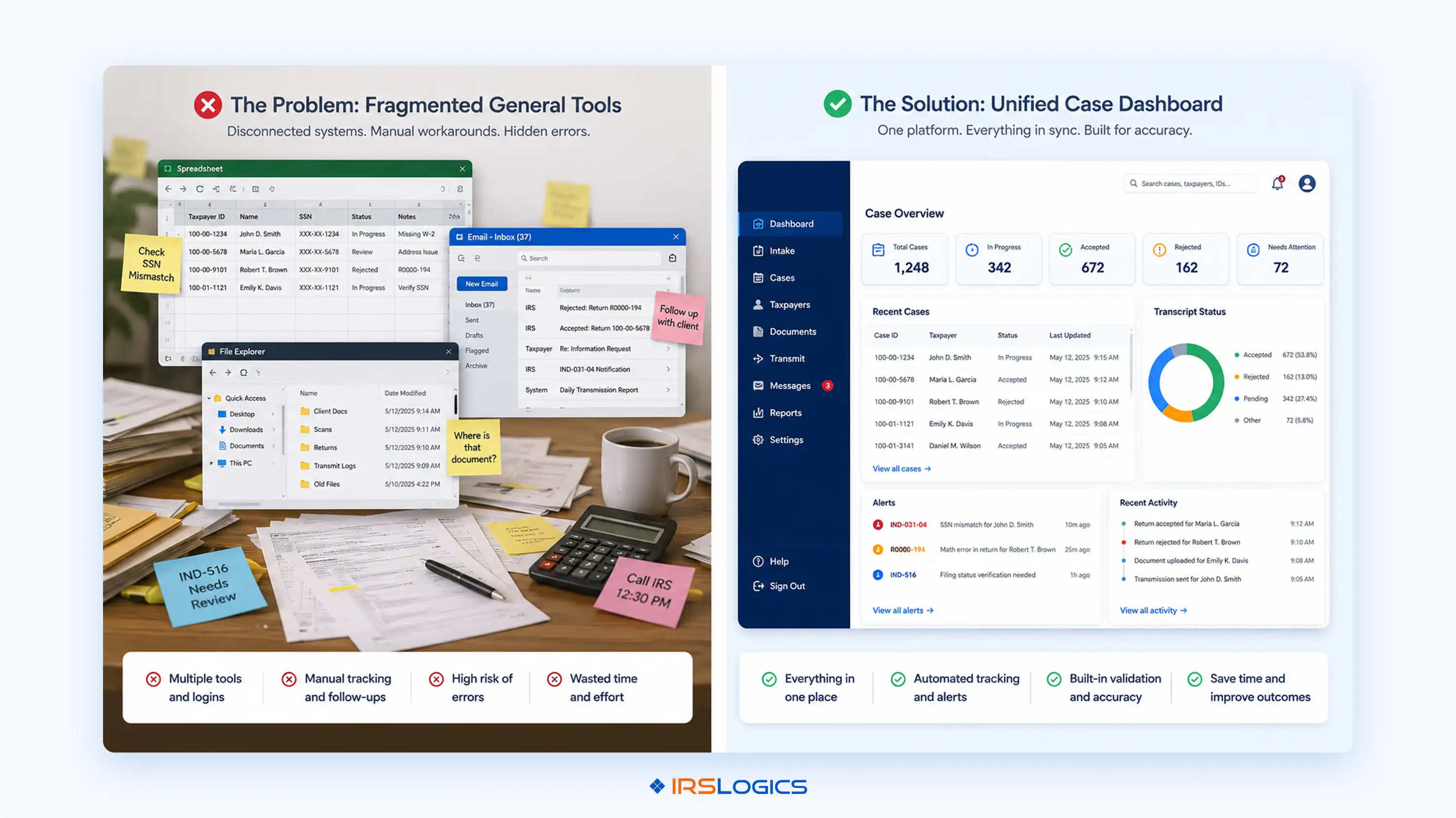
The problem isn't that general tax software is bad. It's that it was never designed for resolution work. It doesn't know what a CSED is. It has no concept of an installment agreement workflow. It can't pull IRS transcripts from inside a case record. It has no client portal for document collection, no e-signature flow, no way to track which invoice is still unpaid two months after you sent it.
Tax resolution is a case management problem, not a filing problem. The software you use has to reflect that.
When you're evaluating online tax software for a resolution practice, run it through these four categories. A platform that scores well on only one or two will create problems somewhere.
Security is the first question, and it should be non-negotiable. You're handling sensitive client financial data, IRS correspondence, and personally identifiable information that falls under strict professional standards set by bodies like the National Association of Enrolled Agents.
What good security looks like in tax resolution software:
That last point matters more than people realise. If your software integrates with a bureau to pull tri-bureau credit reports for clients, the consent workflow needs to be built in. You can't bolt compliance on after the fact.
The audit trail deserves its own mention. Enrolled agents are responsible for maintaining accurate client records under NAEA practice standards. A platform that logs every case action, document upload, form submission, and status change protects you, not just your client.
General tax software almost never includes this level of accountability infrastructure. It wasn't built for practice management.
Speed isn't about how fast you can click through a screen. It's about how much of your day disappears into tasks the software should be handling for you.
The biggest time drains in a resolution practice:
A financial questionnaire that auto-populates the 433-A, 433-B, and OIC worksheets directly from client input eliminates one of the most tedious re-keying loops in resolution work. The client fills in their financial information once. The firm is notified. The data populates where it needs to go. No re-entry. No transcription errors.
Transcript access is another meaningful speed factor. The IRS Transcript Delivery System has specific access requirements, but the question for software evaluation is whether that access is native to the case record or requires a separate tool. Being able to initiate a request from inside a client case, and have the result logged automatically, is a different workflow from pulling transcripts separately and updating your notes manually.
SMS communication is also worth examining. If you're texting clients from your personal phone and your staff is using theirs, you have no conversation record. A threaded SMS view inside the platform means every message sent and received is visible to anyone on the case, not just the person who sent it.
This one gets skipped in most software reviews. It shouldn't.
A resolution firm isn't one person. It's a mix of case managers, sales staff, billing teams, and attorneys who need different levels of access to different parts of the system. If everyone sees everything, you have a compliance problem and a privacy problem.
What a proper roles and permissions system looks like:
Lead distribution is connected to this. If you're running a firm with inbound leads and a sales team, you need to be able to distribute those leads by allocation ratio, not manually assign them one by one. That's a workflow feature most general tax software doesn't have, because most general tax software isn't built for firms.
General CRMs often get considered as alternatives here. But as covered in IRSLogics' comparison of tax resolution CRM vs general CRM, a sales CRM doesn't understand IRS case workflows, doesn't have built-in IRS forms, and doesn't connect billing to resolution case stages. The difference matters in practice.
Your clients are stressed. They have IRS debt, they're receiving notices, and they've already had at least one conversation that scared them. The experience your firm creates for them, through the software you use, is part of your professional reputation.
What a strong client experience looks like from a software perspective:
The document collection piece is worth examining closely, especially for larger firms. A document collection tab that tracks the status of each request, rather than relying on email follow-ups, changes how onboarding runs. It's visible, accountable, and faster.
Client-facing features are often treated as secondary to internal workflow features in software evaluations. That's the wrong order. Clients who can't figure out how to send you documents, or who feel like they're chasing you, create bottlenecks that slow resolution. The software should make it easy for them to do their part.
IRSLogics includes role-based access control, a full audit trail of every case action, and login history with timestamps and IP tracking. The iSoftPull integration for tri-bureau credit reports includes proper consent workflows built into the platform.
The Financial Questionnaire sends a fillable form to the client. When they complete it, the data auto-populates into the 433-A, 433-B, and OIC worksheets inside the platform. Transcript requests are initiated directly from the case record through the built-in TDS integration. The SMS Conversation View logs all client text communication in a threaded view inside the case. As covered in the IRSLogics walkthrough of tying payments to invoices, billing clarity is built into the workflow, not bolted on.
Roles and permissions are configurable by firm administrators. Lead distribution by allocation ratio is built in. The Document Collection Tab supports multi-office workflows for firms collecting documents from clients at scale.
The client portal is branded, secure, and handles documents, e-signatures, billing, appointment booking, and communication in one place. Google Calendar and Calendly sync with appointments booked through the portal, as covered in the IRSLogics guide to syncing appointments with Google Calendar. E-sign is native to the platform.
IRSLogics is purpose-built for tax resolution. Every feature above maps to a real stage in the resolution case lifecycle. It was not adapted from a general CRM. It was built for resolution work from the start.
This blog runs online tax software through four categories: security, speed, permissions, and client experience. IRSLogics was built to hold up across all four, not just one.
On security, the platform includes role-based access control, a full audit trail of every case action, and login history with timestamps and IP tracking. On speed, the Financial Questionnaire your client fills out once auto-populates directly into Form 433-A, 433-B, and OIC worksheets inside the platform. Transcript requests are initiated from inside the case record. All client SMS communication is logged in a threaded view, visible to the whole team, not just the person who sent the last message.
On permissions, roles are configurable by firm administrators so sales staff, case managers, billing teams, and attorneys each see exactly what they need and nothing they do not. On client experience, the branded client portal handles document uploads, e-signatures, appointment booking, and billing in one place, so clients are not being asked to email attachments or download a separate tool to sign a form.
It is not a general CRM adapted for resolution work. It was built for the resolution case lifecycle from the start, which is the difference that shows up in daily use rather than in a feature comparison slide.
Explore the full feature set or view plans and pricing to see how it scores for your firm.
Is TurboTax or H&R Block suitable for tax resolution professionals?
No. They are built for individual filing, not for managing IRS cases, documents, or long-term workflows.

What features should tax resolution software include that general tax prep software doesn't?
It should handle full case management. Forms, transcripts, documents, signatures, billing, and user roles in one system.
How important is user permission control in tax software for firms?
Very important. Without role-based access, you either risk compliance issues or slow down your entire workflow.
What does "client experience" mean in the context of tax resolution software?
It is everything the client interacts with. Uploads, signatures, scheduling, and billing all need to be simple and clear.
How does a financial questionnaire reduce errors in IRS form preparation?
It captures data once and reuses it. No repeated entry means fewer mistakes and faster form completion.
Can tax resolution software integrate with Google Calendar and other tools?
Yes. Good platforms connect with calendars and communication tools to keep everything in sync.
What is the difference between tax resolution software and a general CRM?
A CRM tracks contacts. Resolution software manages full IRS case workflows, documents, forms, and billing together.
The search for the best online tax software has a different answer depending on who's asking.
For tax resolution professionals, it's not any of the names that top the consumer roundups. It's software that scores well across all four categories: security, speed, permissions, and client experience. Software built for resolution work, not adapted for it.
A few things worth carrying forward:
If you want to see how a purpose-built resolution platform handles all four categories in practice, book a free demo at IRSLogics.
All
Tax Software
Workflow & Automation
Industry News
Resolution Tips
Tax Resolution Marketing

Lorem ipsum dolor sit amet, consectetur adipiscing elit. Suspendisse varius enim in eros elementum tristique. Duis cursus, mi quis viverra ornare, eros dolor interdum nulla, ut commodo diam libero vitae erat. Aenean faucibus nibh et justo cursus id rutrum lorem imperdiet. Nunc ut sem vitae risus tristique posuere.


Share this article directly by email. Simply enter the recipient’s details below.

Article has been send to you.