Tax Software


You submitted the return. You got a rejection. The client is calling. You have no idea where the acknowledgement is, and the rejection code is sitting there meaning nothing to you without context.
This is what bad e-file workflow looks like.
And if you are using tax filing software for preparers that was not built to handle this cleanly, you will be in this situation more than once a season.
This guide covers the full e-file lifecycle as a working preparer: setting up your workflow before transmission, reading acks correctly, fixing the rejections that actually come up most often, and building a client communication SOP that keeps people informed without you manually sending updates every time something changes. It also covers how purpose-built tax resolution platforms handle the e-file layer differently from general tax prep tools.
Most preparers know the high-level version.
You prepare the return, transmit it, wait for the ack, and either log it as accepted or fix the rejection. What actually breaks workflows is everything that happens in between.
Here is how a clean e-file workflow runs from start to finish:
Client data collection. Financial information, prior-year AGI for identity verification, dependent information, and all income documents are gathered before the return is touched. Missing information at this stage causes rejections at transmission, not at preparation. The return looks complete. The IRS disagrees.

Return preparation and diagnostics. Once the return is built, run your software's diagnostic check before transmitting. Most professional tax filing software for preparers flags known reject triggers before you send. A missing PIN, an AGI mismatch, or a dependent already claimed elsewhere will come up here if your software is doing its job.
Transmission to the IRS. Returns are filed with the IRS through an ERO (Electronic Return Originator). Your software handles the mechanics, but you need a dashboard that shows which returns are in flight, which are accepted, and which are rejected. If that visibility is not there, you are chasing status manually across a client roster.
Acknowledgment retrieval. The IRS sends back an ack within 24 to 48 hours for most returns. Your software should pull these automatically. If you are downloading acks manually or checking a separate system, that time should be spent elsewhere.
Rejection handling or acceptance confirmation. Accepted returns are logged and the client is notified. Rejected returns are routed through a correction workflow. This is where most preparers lose time if they do not have a clear process in place.
The workflow sounds simple. The problem is that most general tax preparation software treats each step as a separate action rather than a connected case record.
An acknowledgment from the IRS is not a simple yes or no.
It contains the submission ID, the received timestamp, the status (accepted or rejected), and in the case of rejections, the error codes with rule numbers.
Accepted acks confirm that the IRS received the return and it passed basic validation. It does not mean the return is fully processed. Preparers who confuse acceptance with processing completion end up in uncomfortable conversations with clients who call asking why their refund has not arrived yet.
Rejected acks contain rule numbers from the IRS MeF (Modernized e-File) system. Each rule number corresponds to a specific validation check the IRS runs before accepting a return. Your e-file software should translate these rule numbers into plain English. If it does not, you are cross-referencing IRS documentation every time a return comes back rejected.
The most important number on a rejected ack is the rule number.
The most important thing your software should do is tell you exactly what failed and what to change. If that translation is not built into your platform, you are adding 20 to 30 minutes of research time to every single rejection.
Not all rejections are equal. Some take five minutes to fix. Some require you to go back to the client for documentation. Here are the ones that come up most often and what to actually do about them.
This is the most common rejection for first-time e-file clients and clients who used a different preparer in the prior year. The AGI the client provided does not match what the IRS has on record.
Fix: Confirm the prior-year AGI from the client's actual filed return. If the client filed on extension or the prior-year return was amended, the IRS may not have updated the figure yet. In some cases, entering zero as the prior-year AGI resolves the issue for first-time e-file clients who have never filed electronically before.

A dependent claimed on this return is already listed on a return filed by another taxpayer. This comes up frequently in divorced or separated households where both parties attempt to claim the same child.
Fix: Confirm custody arrangements and which party has the legal right to claim the dependent for that tax year. If your client has the right to claim, the other return may need to be investigated for identity theft or a filing error. The IRS has a tiebreaker rule process for these situations, and the NAEA provides detailed guidance for enrolled agents handling dependent disputes.
The primary taxpayer's Social Security Number was already used in a return submitted for this tax year.
Fix: This is a potential identity theft situation. Advise the client to file Form 14039 (Identity Theft Affidavit) and follow the IRS Identity Protection process. The return will need to be filed on paper until the identity issue is resolved with the IRS directly.
The Employer Identification Number on the W-2 does not match the IRS database.
Fix: Verify the EIN directly from the physical W-2 document. Typos during data entry are the most common cause. If the EIN is correct and the rejection persists, the employer may not have filed the W-2 with the IRS, in which case the return may need to be paper-filed.
Tax preparers evaluate software on features.
Forms coverage. Price per return. Integration options. Support quality. What most evaluation frameworks miss is how the software handles the messy middle, which is everything that happens between transmission and final client confirmation.
The best tax filing software for preparers does not just transmit returns. It maintains a real-time status view across all returns in flight. It pulls acks automatically and flags rejections without requiring you to check a separate log. It keeps a record of what was fixed, when, and by whom.
When you are managing 40 or 50 returns during peak season, you cannot manually track which returns are pending, which are rejected, and which have been corrected and resubmitted. That is not a workflow problem. That is a software selection problem.
Tools like Drake Software and TaxAct are built for tax preparation. They handle the e-file mechanics well. What they were not designed for is the ongoing case management layer that resolution and full-service firms need.
IRSLogics handles this differently. Because the platform is built around the full case lifecycle rather than the annual return cycle, the e-file status lives inside the same client case record as the transcript data, the document collection, and the billing history. When a rejection comes in, the case record updates and the task is assigned inside the same system where all other case work happens. Nothing is siloed. Nothing requires a separate login or a separate spreadsheet.
The most common source of client anxiety during tax season is not knowing where their return is.
They filed, they paid, and now they are waiting. Without a communication SOP, every client who does not hear from you within 48 hours will call or email asking for an update. Multiply that across a full roster during the last two weeks of April and you understand why client communication without a system is a problem.
A working client communication SOP for e-file looks like this:
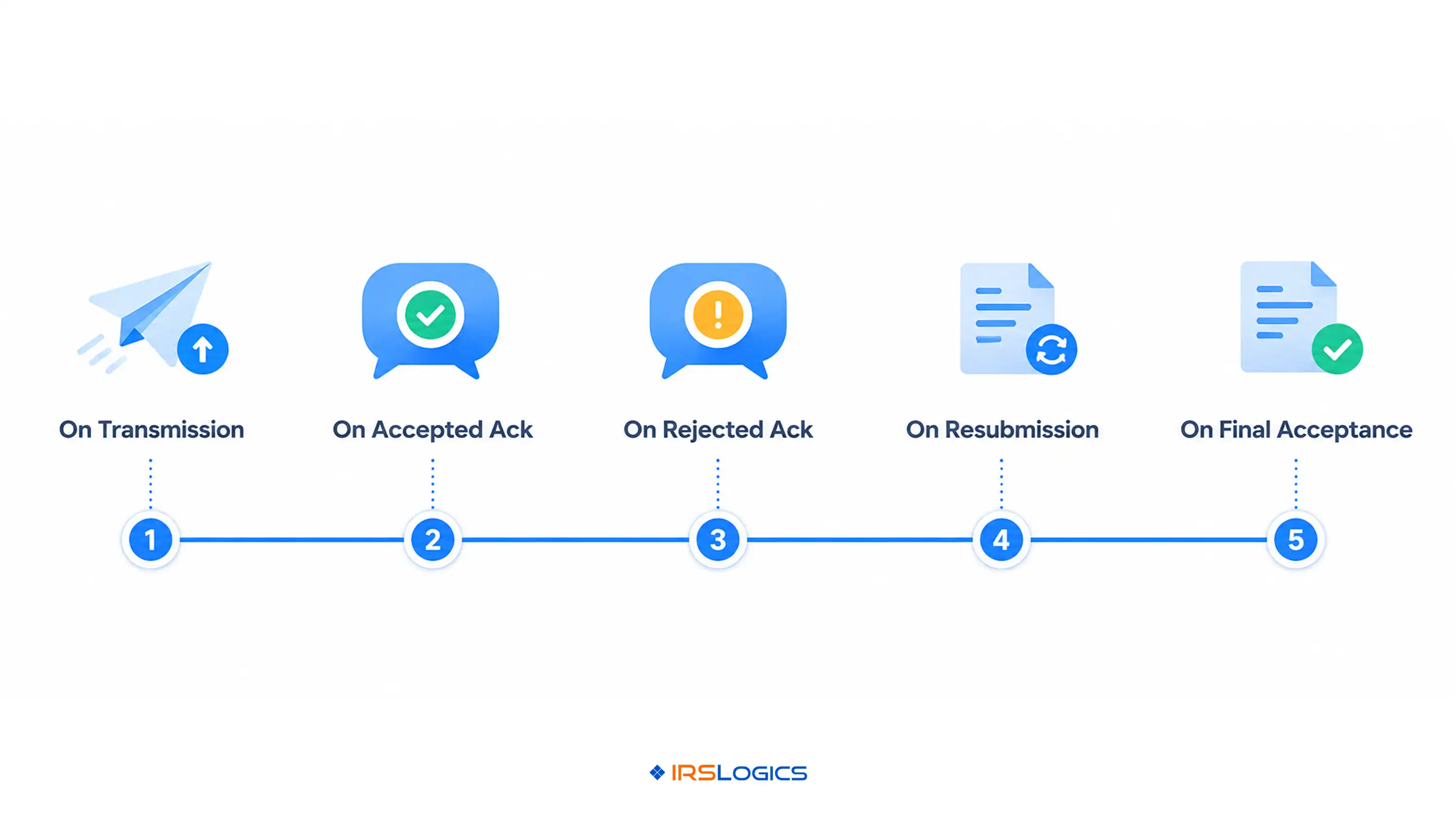
On transmission. Send a confirmation noting that the return has been submitted and they will hear back within 48 hours once the IRS acknowledgement is received. Include the expected refund timeline if applicable.
On accepted ack. Send an acceptance confirmation. Include the acknowledgement number, the expected refund timeline from the IRS, and a note that they can check refund status using the IRS Where's My Refund tool.
On rejected ack. Contact the client immediately. Explain the rejection reason in plain language, what you need from them to fix it (if anything), and the corrected timeline. Never send a rejection notice without a clear next step attached.
On resubmission. Notify the client that the corrected return has been resubmitted and they will hear back within the same 48-hour window.
On final acceptance after correction. Confirm acceptance and the updated refund timeline.
The tool you use to send these communications matters. If you are pulling client contact details from one system, drafting messages in another, and tracking send history in a spreadsheet, you are doing five minutes of admin work per client update.
IRSLogics handles this inside the platform. The SMS Conversation View keeps all client communication in a threaded record. Mass SMS allows bulk status updates to be sent in one action. Templates mean you are not writing the same acceptance message from scratch for the fortieth time. And because all of this lives inside the client case record, you have a complete communication history without hunting through your inbox. For firms that have already explored how IRSLogics handles the document collection side of onboarding, the communication tools follow the same logic: less manual effort, more traceability.
Tax resolution work is not annual.
A client with IRS debt, a pending OIC, or an active installment agreement is a client you are working with continuously. The e-file component for that client is one event inside a much larger case that might span months or years.
General tax prep software is designed around the annual return cycle. It handles one return at a time and moves on. It was not built to track where a client is in an OIC process while also managing their current-year return while also pulling their transcripts and managing their document collection.
This is the difference between a tax preparation tool and a tax resolution platform. The NAEA outlines the full scope of enrolled agent representation, which makes clear that case management and ongoing IRS representation are distinct from filing. The software tools for those two activities should reflect that distinction.
IRSLogics is built for practitioners who live in the resolution workflow. The e-file function sits alongside the transcript pull, the Financial Questionnaire that auto-populates the 433-A and OIC worksheets, the Document Collection Tab, and the Client Portal. Everything connects because resolution cases require that connection. For enrolled agents specifically, this matters. You are representing clients through the full case lifecycle, not just handling their annual return. Firms that have made the switch from general practice management tools consistently note the same thing: the case management depth is not something a general CRM can replicate, as covered in the breakdown of how a tax resolution CRM differs from a general CRM.

This blog covers what clean e-file workflow looks like in practice. For tax resolution professionals, that workflow does not end at acceptance. The e-file event is one step inside a case that may span months, and the software needs to hold it all together.
IRSLogics is built for exactly that. The e-file status lives inside the same client case record as the transcript data, document collection, and billing history. When a rejection comes in, the task is assigned and tracked inside the platform without requiring a separate login, a separate spreadsheet, or a manual follow-up reminder.
On the client communication side, the SMS Conversation View keeps all client updates in a threaded record tied to the case. Templates mean acceptance and rejection notices go out without being rewritten each time. Mass SMS lets you send bulk status updates in one action during peak season. Nothing lives in your inbox and nothing falls through.
For resolution practitioners specifically, the platform connects the e-file layer to IRS transcript pulls, the Financial Questionnaire that auto-populates Form 433-A and OIC worksheets, document collection, and the client portal. The return is one part of the case. The platform treats it that way.
Explore the full feature set or view plans and pricing to see how IRSLogics fits your practice.
What software do professional tax preparers use?
Most use tools like ProConnect, Drake, or UltraTax for filing. Resolution firms add platforms built for case lifecycle, not just returns.
How much does tax software for tax preparers cost?
It depends on the pricing model. Some charge per return, others per filing, while resolution tools run on subscriptions.
Can professional tax preparers use TurboTax?
No. It is built for individuals, not for firms managing multiple clients, filings, and compliance requirements.
What is the difference between an ack and a refund status?
An ack means the IRS received and accepted the return. It does not mean the refund is approved or issued.
What should I do if a return keeps getting rejected after correction?
After repeated rejections, paper filing is usually the next step. Document everything and guide the client if identity issues are involved.
Is e-file software the same as tax resolution software?
No. One handles filing, the other manages ongoing IRS cases, documents, and communication over time.
How long does it take to get an acknowledgement after e-filing?
Typically within 24 to 48 hours. It may take longer during peak times or weekends.
E-file workflow is not complicated. But it is detailed, and the details matter.
A clear SOP, a software platform that handles ack retrieval automatically, and a rejection management process that does not require manual IRS documentation lookup will save your firm real hours every tax season.
For resolution practices, the e-file component is one piece of a larger operational picture.
The software built for the way you actually work.
All
Tax Software
Workflow & Automation
Industry News
Resolution Tips
Tax Resolution Marketing

Lorem ipsum dolor sit amet, consectetur adipiscing elit. Suspendisse varius enim in eros elementum tristique. Duis cursus, mi quis viverra ornare, eros dolor interdum nulla, ut commodo diam libero vitae erat. Aenean faucibus nibh et justo cursus id rutrum lorem imperdiet. Nunc ut sem vitae risus tristique posuere.


Share this article directly by email. Simply enter the recipient’s details below.

Article has been send to you.