Tax Software


The days when a tax practice could operate from spreadsheets, sticky notes and a shared inbox are over. Clients expect fast responses, clear communication and consistent follow-through, especially when they are dealing with the IRS.
For tax resolution firms, CPAs and enrolled agents in the US, the stakes are even higher. IRS cases involve:
Generic customer relationship management tools can help, but they are not designed around IRS case work, compliance or the realities of tax resolution.
That is why a growing number of firms are looking for the best CRM for tax professionals, explicitly built for tax resolution firms and IRS representation work, rather than adapting generic sales software.
IRSLogics sits squarely in this space: a web-based CRM and case management platform explicitly created for tax resolution professionals, with integrated IRS forms, workflows, billing, analytics and client communication tools.
When tax pros say they are looking for the best CRM for tax professionals, they often start with general CRM expectations:
Many firms try to adapt popular generic CRMs to tax use cases. Others bolt on email marketing, e-signature and task tools as they grow.
The problem is that generic CRM platforms:
By contrast, a tax resolution CRM like IRSLogics starts with tax-specific assumptions: it is designed from day one as a CRM for CPAs and enrolled agents who handle IRS resolution work.
A CRM for tax resolution firms needs to manage both front-end sales and back-end case management. That is where generic tools fall short.
Typical pain points when firms rely on generic CRMs:
Specialized platforms like IRSLogics, IRS Solutions and PitBullTax all emerged to solve these exact problems. IRS Solutions is marketed as an integrated tax resolution and IRS monitoring platform for CPAs, enrolled agents and other tax pros, combining case management, forms, billing and alerts.
PitBullTax positions itself as a leading tax resolution software with case management, billing, integrated IRS forms and step-by-step workflows.
IRSLogics focuses specifically on being a comprehensive CRM and case management system for tax resolution professionals, combining lead management, auto-generated IRS forms, workflow management, billing, finance, reporting, e-signature and more in a 100 percent browser-based solution.
This is why the best CRM for tax professionals who handle IRS cases is almost always a tax resolution CRM, not a generic tool.
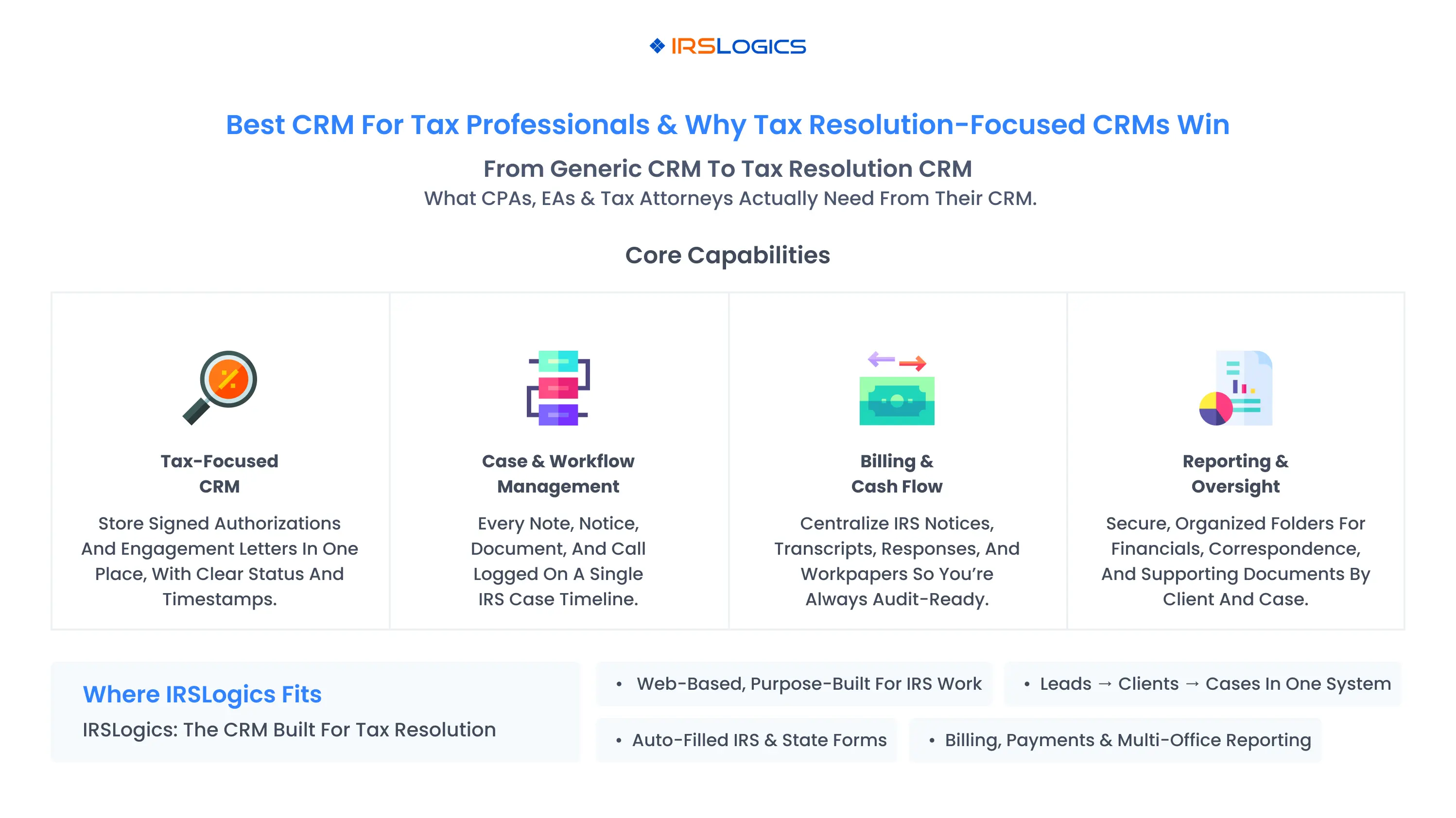
Regardless of which vendor you choose, a CRM for CPAs and enrolled agents that handle resolution work should deliver four categories of capabilities.
The best CRM for tax professionals will treat these as standard features, not bolt-ons.
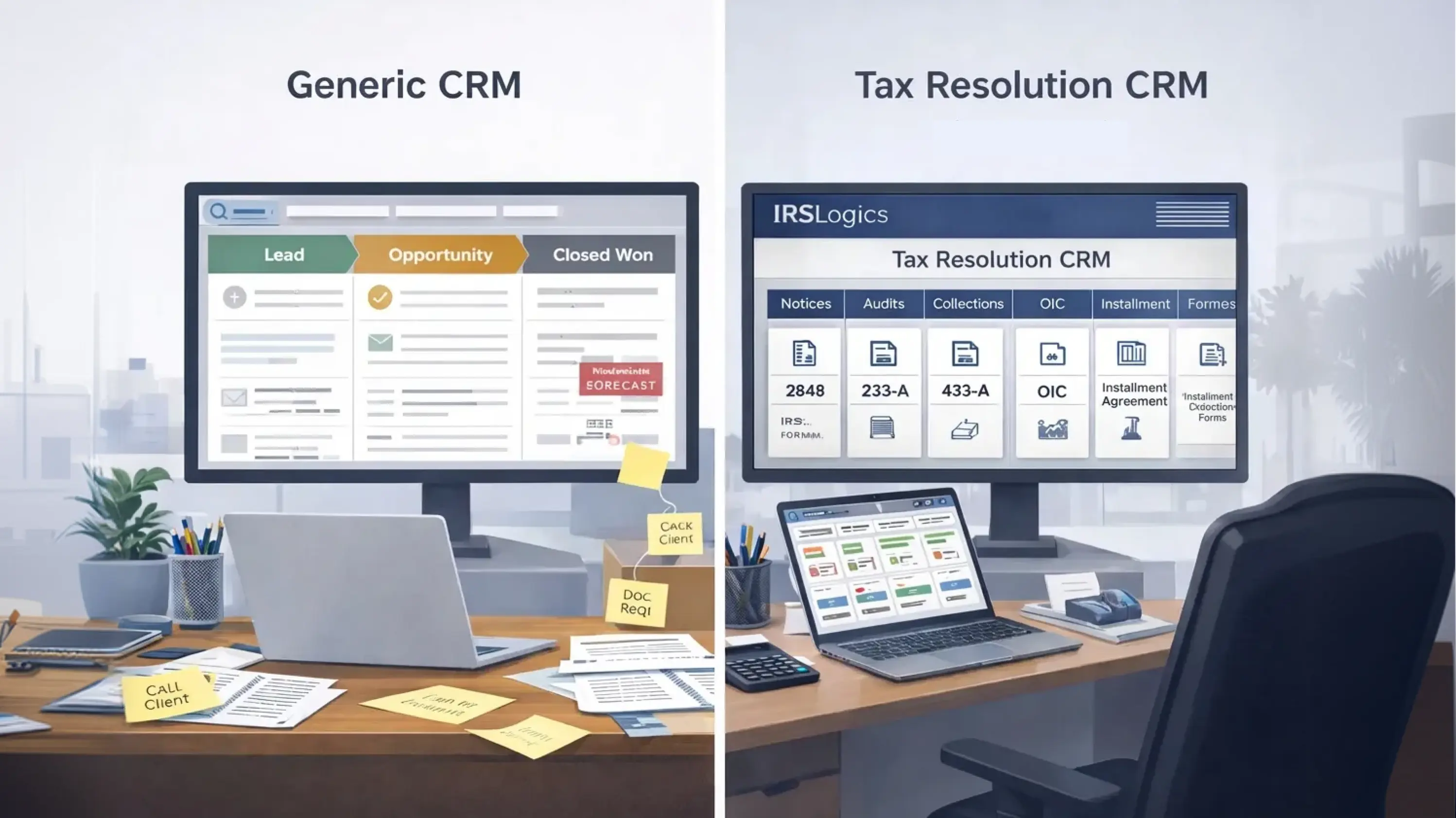
When you perform a tax resolution CRM vs generic CRM comparison, several differences stand out.
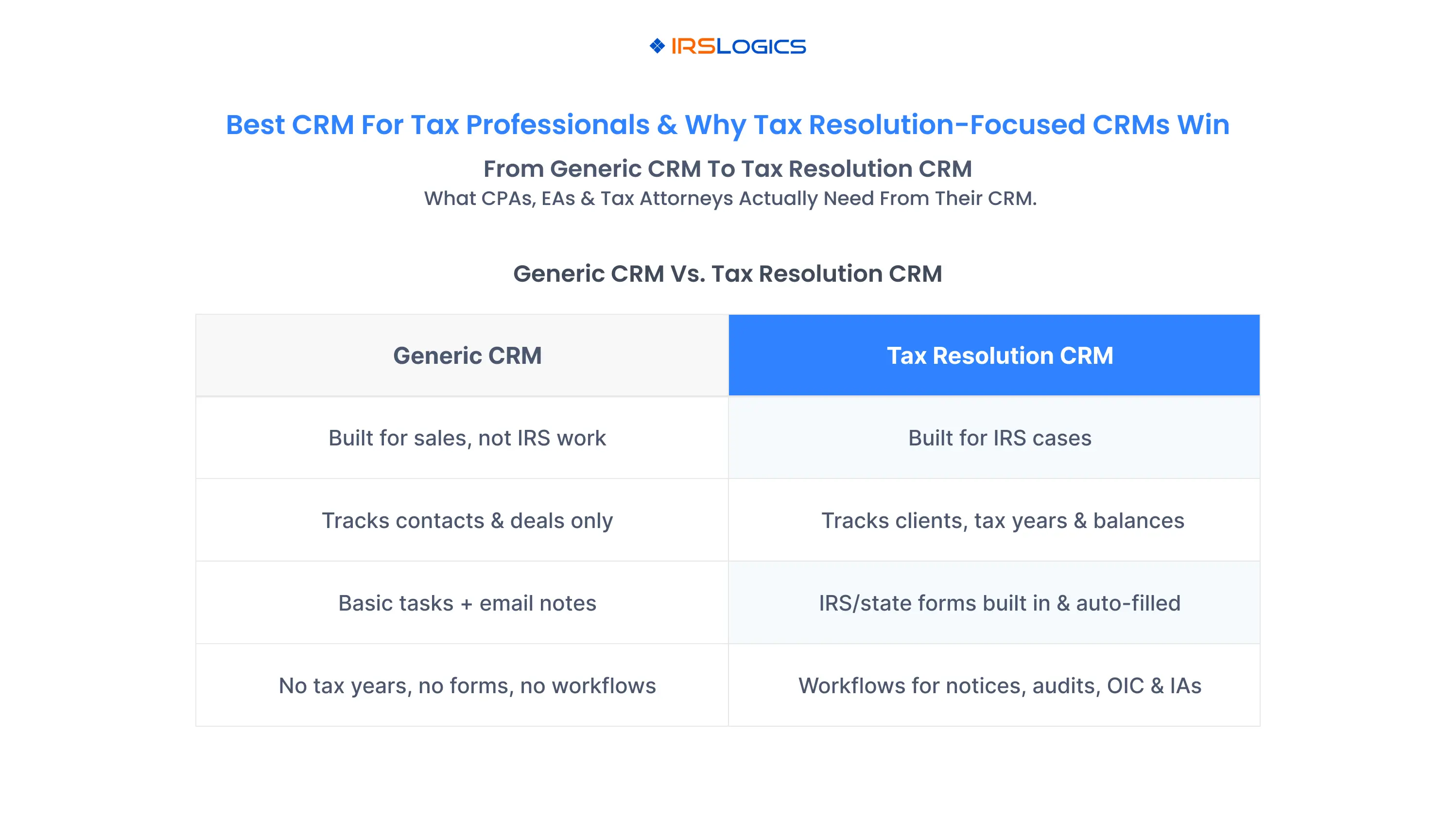
Tax resolution CRM (like IRSLogics):
Generic CRM:
For a seasonal tax prep practice, a generic CRM might be enough. For a firm looking to grow its tax resolution and IRS representation services, a dedicated tax resolution CRM is usually the smarter long-term bet.
IRSLogics is consistently described in independent directories as web-based CRM software for tax resolution firms, created for tax resolution professionals.
Core CRM capabilities include:
This makes IRSLogics a strong candidate when evaluating the best CRM for tax professionals who also need a robust IRS case platform.
IRSLogics goes beyond contact management by offering:
Where competitors like PitBullTax and IRS Solutions also provide workflows and forms, IRSLogics emphasizes mapping cleanly to how a tax resolution shop actually works, with case timelines and role-based permissions to keep everyone aligned.
A key difference between a CRM for tax resolution firms and a generic CRM is billing:
PitBullTax and IRS Solutions also emphasize billing and payment features as part of their all-in-one value proposition, but often through add-ons or bundled memberships.
If your firm wants a CRM for CPAs and enrolled agents that can also track revenue, collections and profitability by case, these built-in finance features are critical.
IRSLogics offers reporting and analytics as a core part of the tax resolution CRM experience:
This allows partners and managers to:
These capabilities elevate IRSLogics from a simple CRM for tax professionals to a full management platform for tax resolution businesses.
Multiple independent sources emphasize that IRSLogics is entirely web-based, requires no on-premises setup and can be accessed from any device as long as there is an internet connection.
Combined with support for multi-office configurations, this allows:
For modern tax resolution firms, that flexibility is non-negotiable.
When comparing CRM options, use a framework tailored to tax practices rather than generic sales criteria.
Questions to ask:
By evaluating CRM for tax professionals through this lens, you will naturally gravitate toward tax resolution-focused options.
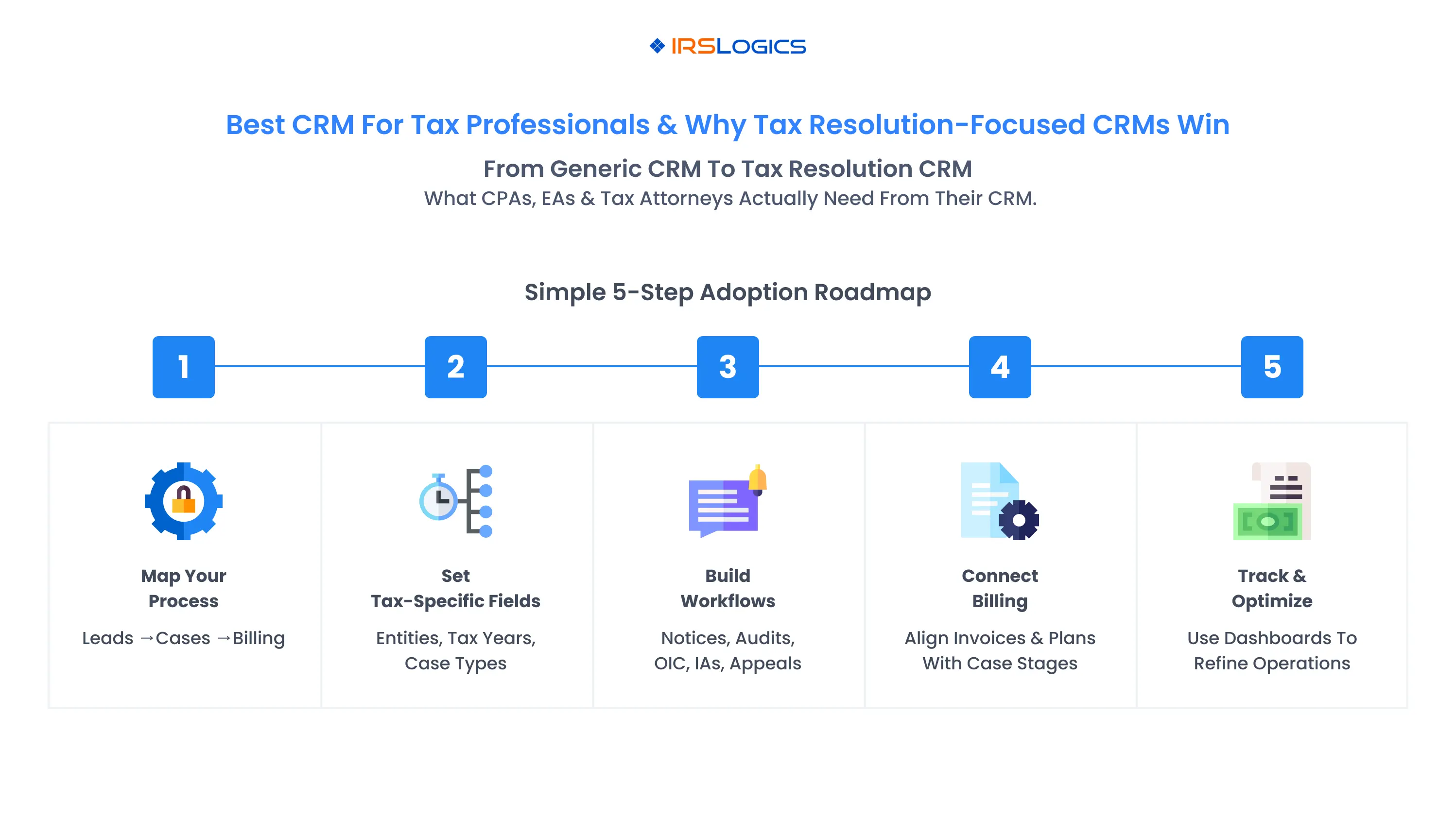
To adopt a tax resolution CRM like IRSLogics without overwhelming your team, follow a phased plan.
Step 1: Map your current client and case flow
Step 2: Configure CRM foundations
Step 3: Build case workflows
Step 4: Integrate billing and payments
Step 5: Train staff and refine
Within a few months, the CRM for tax resolution firms becomes the operational hub of your practice, replacing fragmented tools and ad-hoc tracking.
If your work stops at tax preparation, a generic CRM may be enough. But if your firm is serious about IRS notices, audits, collections and settlements, you need more than a generic tool.
A tax resolution CRM:
IRSLogics delivers exactly that. As a web-based CRM for tax professionals focused on tax resolution, it combines lead management, client and case tracking, IRS forms, workflows, billing, analytics and multi-office support in a single platform.
That is why, when you compare tax resolution CRM vs generic CRM, firms that want to grow resolution work almost always end up choosing a specialized platform like IRSLogics as the backbone of their practice.
The best CRM for tax professionals goes beyond generic contact management. It understands tax-specific workflows, supports case-based work, integrates with IRS and state forms, provides billing and analytics and is built for CPAs, enrolled agents, tax attorneys and resolution firms. Platforms like IRSLogics, IRS Solutions and PitBullTax are examples of tax-focused CRMs rather than generic tools.
A CRM for tax resolution firms combines CRM and case management, offers tax-specific workflows, integrates IRS and state forms and ties billing and reporting to case stages. Generic CRMs focus on traditional sales pipelines and require significant customization to handle IRS resolution work.
IRSLogics is a web-based CRM and case management system designed specifically for tax resolution professionals. It offers lead management, auto-generated IRS forms, workflow management, billing and finance, reporting, e-signature and strong client management features, all tailored to CPAs, enrolled agents and tax attorneys who handle IRS resolution work.
You can, but it usually requires custom fields, complex workflows, integrations for documents and billing and ongoing maintenance. Many firms find that starting with a purpose-built tax resolution CRM like IRSLogics is more efficient and less risky, especially as case volume grows.
No. A tax resolution CRM complements your tax preparation suite. You still use tax prep software for returns and e-filing, while the CRM for tax professionals handles leads, IRS cases, workflows, documents, billing and analytics for resolution and controversy work.
If you want, next I can help you spin this into a shorter landing page or a comparison checklist you can use on the IRSLogics site for “tax resolution CRM vs generic CRM.
All
Tax Software
Workflow & Automation
Industry News
Resolution Tips
Tax Resolution Marketing

Lorem ipsum dolor sit amet, consectetur adipiscing elit. Suspendisse varius enim in eros elementum tristique. Duis cursus, mi quis viverra ornare, eros dolor interdum nulla, ut commodo diam libero vitae erat. Aenean faucibus nibh et justo cursus id rutrum lorem imperdiet. Nunc ut sem vitae risus tristique posuere.


Share this article directly by email. Simply enter the recipient’s details below.

Article has been send to you.